


 |
Keyboard Supports Available |

Create Windows Desktop-like MenuBar
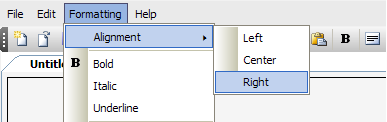
Use WebMenuBar control to easily build a Windows Desktop-like's MenuBar. WebMenuBar is designed with a professional architecture and object model as well as specialized user interface for each elements. Therefore, WebMenuBar provides a flexibility to create a Windows-like MenuBar object which is not only rich in styles, but also in every functions and behaviors.
Integration with PlaceHolderManager
WebMenuBar has the ability to be integrated with PlaceHolderManager. You may perform a dockable MenuBar which commonly found in desktop-based applications. By using PlaceHolderManager architecture, you can freely dock the MenuBar together with WebToolBar with no extensive coding required. Learn more about PlaceHolderManager concepts and Interactive PlaceHolderManager Designer for better understanding concepts.
Interactive Designer
WebMenuBar is also supported with an interactive designer which eases you during design and development time process. No more unvisualized designer or hard coding, with Interactive PlaceHoderManager Designer and VisualMenu Builder you are given a visualization in high WYSIWYG details.
MenuItem Types
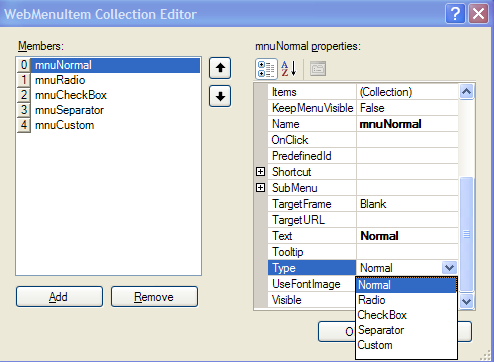 |
In MenuItem Types, we have 5 different types of command, such as: |
Interactive Designer
The following table lists the client side events available in this release.
| Client Side Event | Description |
| OnClick | Invoked when control is clicked. |
| OnDblClick | Invoked when control is double-clicked. |
| OnMouseDown | Invoked when MouseDown event is fired on control. |
| OnMouseMove | Invoked when OnMouseMove event is fired on control. |
| OnMouseOut | Invoked when mouse is outside while event is fired on control. |
| OnMouseOver | Invoked when MouseOver event is fired on control. |
| OnMouseUp | Invoked when MouseUp event is fired on control. |
 See Also
Getting Started
{Features}
{Styles}
{Keyboard Supports}