


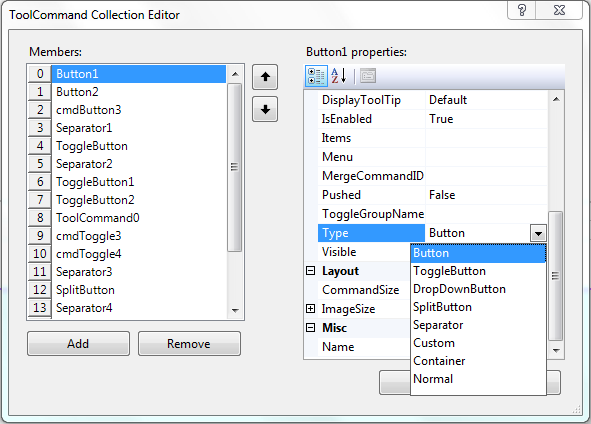
WebToolBar has several command types for its Items. These ToolCommand's Types consist of : Button, Toggle Button, DropDown Button, Split Button, Separator, Custom, Container and Normal.
This topic will show you how to assign a command type to each item in WebToolBar and what the functionality of each type.
To use ToolCommand Types
- Right click WebToolBar control and choose Properties.
- Go to Commands and click the collection button.
- ToolCommand Collection Editor will appear.
- Click Add to add New Item and Remove to remove the Selected Item.
- To change the ToolCommand Types, set Type to any available ToolCommand types.
 See Also
Related Articles
{Using Templated Command}
{Creating Standalone Toolbar}