


WebPaneManager integrates closely with WebSplitter in order to provide sophisticated resizing and collapsing functionalities. The functions can be configured in the properties described in following:
- AllowResize
The default value in Global level is True. When enabled, users can resize the Pane conveniently in runtime. This feature can be configured in Global level and Individual Pane level.

When a WebPane's AllowResize is set to False, the WebPane in its next sibling would also be affected (disabled as well) since that resizing process involves two paired Panes. 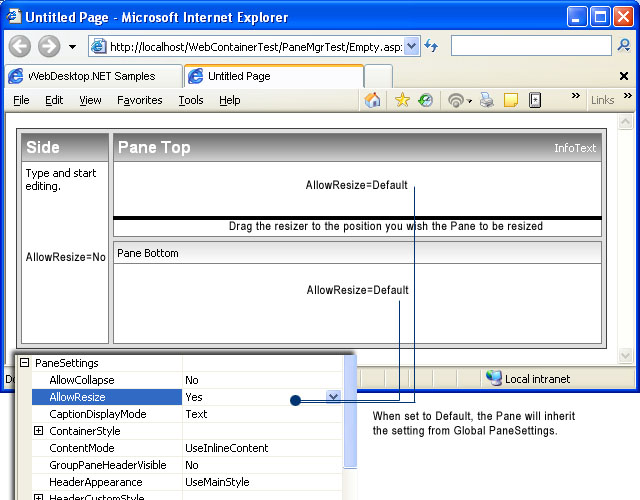
In above illustration, The "Side" and "Pane Top" can't be resized vertically because the "Side" Pane has its AllowResize set to No which affect its next sibling although the "Pane Top" is configured to use Default (in this case Yes since its Global PaneSettings is Yes). However, the horizontal resizing between "Pane Top" and "Pane Bottom" can be performed as desired.
- AllowCollapse
The default value in Global level is False. The best recommendation for enabling this feature is by configuring the AllowCollapse in Individual Pane level so that you can have more control over which direction should the Pane collapsed to. To better understand the usage of AllowCollapse, please see following illustration.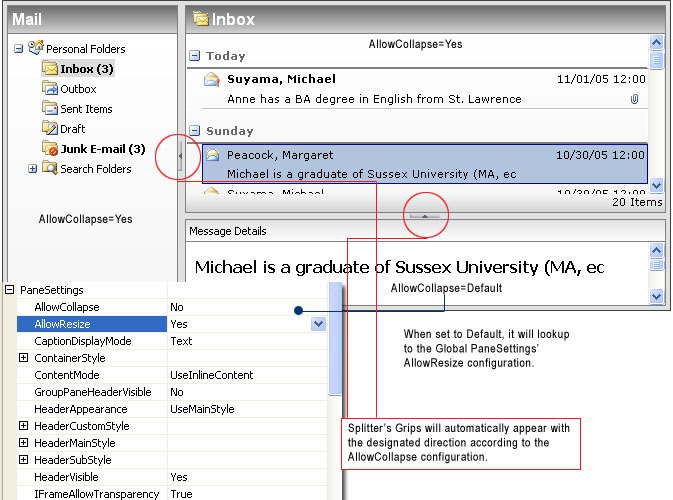

The images for Splitter's Grip can be customized in ImagesSettings. The dynamic interactive style for Splitter (used for resizing) can also be customized in SplitterStyle.