


Introduction
Interactive PlaceHolderManager Designer is a new breakthrough feature for Visual Studio 2005 Development Environment allowing you to work with dockable bars in the designer surface, similar to WinForm-style development experience.
While the PlaceHolderManager designer architecture maintains the docking system of every IBar implemented components (in this release, WebMenuBar and WebToolBar), it still allows you to freely working on the content of the PlaceHolderManager. The content of the PlaceHolderManager is not the type of ITemplate, and therefore enables you to access the controls directly in the code behind without has to use FindControl.
More Details
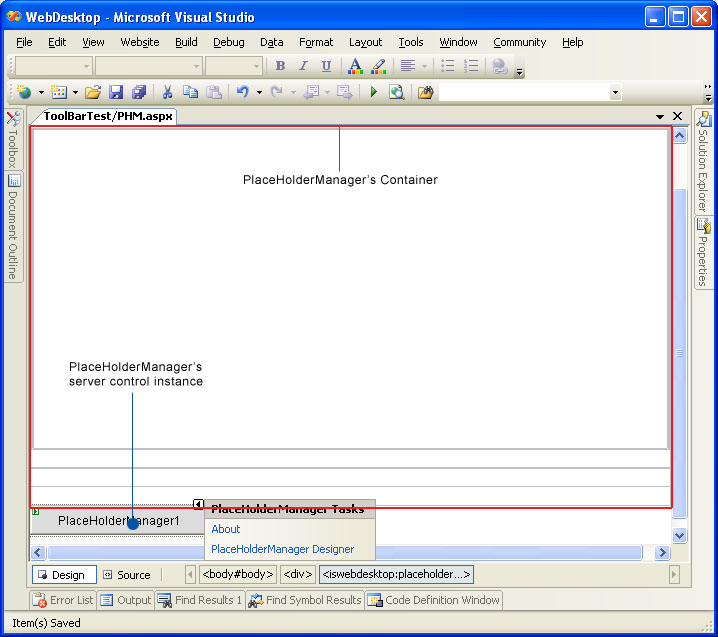
A PlaceHolderManager is a container represented by a four-edge partitioned table which automatically maintained by the PlaceHolderManager system. The following image illustrates a PlaceHolderManager instance at design time.
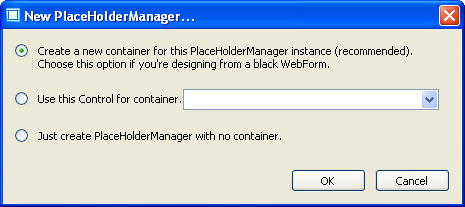
When you drag a new PlaceHolderManager instance to a WebForm designer surface, the PlaceHolderManager Wizard will be launched automatically. It will help you
to construct the PlaceHolderManager's table system with one button click as seen in following screenshot. The result of the container's table is similar to the
above screenshot.
Advanced Features
In the above sections, we have discussed about the basic concepts of the PlaceHolderManager, such as how the PlaceHolderManager can be instantiated in the WebForm designer surface as well as how it looks like in the design time environment.
In this section, provided are several advanced features of the PlaceHolderManager for creating rich and interactive designer experience.
- Automatic Bar Docking
This feature lets you drag any supported bars to anywhere in the designer surface. You don't need to worry where the bars should be inserted because the PlaceHolderManager system will automatically dock the new bar into available slot according to the specified MaxDockingRows and AllowDockBottom, AllowDockTop, AllowDockLeft and AllowDockRight property. By default, the MaxDockingRows property is set to 2 and all the AllowDockXXX properties are set to True.
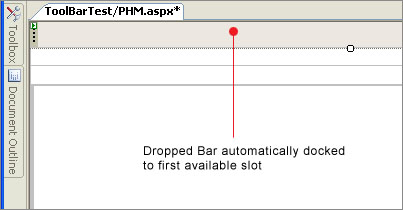
With the default settings above, the first dropped Bar will be automatically docked to first row of Top edge. The second dropped Bar will be docked to second row of Top edge. The third dropped Bar will be docked to first row of Left edge. And so on.
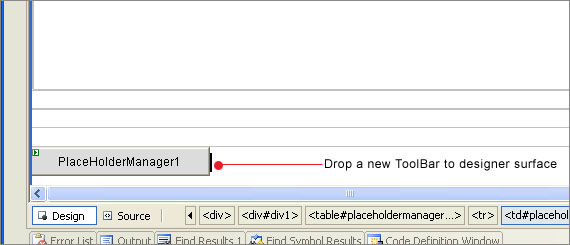
For better understanding, the provided screenshots below demonstrate each action in step-by-step presentation.
Drag and drop first Bar to the designer's surface regardless of its insertion point.
The first dropped ToolBar automatically docked to first row of Top edge.
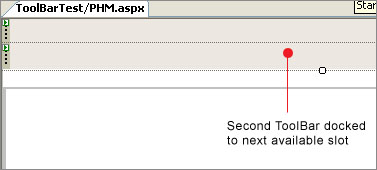
The second dropped ToolBar docked to second row of Top edge, and so on.
- Customize Bar Docking Area
This innovative feature lets you easily change the docking of a Bar at design time. Oftenly developers would need to change the docking position of Bars in the webform, for instance, changing the second row of top's ToolBar to be docked at Left, or changing the left-docked ToolBar to Bottom, and so on.
In traditional approach, developers would have to manually drag and drop the Bars to the position they wanted. However, it can be troublesome to find the correct insertion point especially in a complex table system.
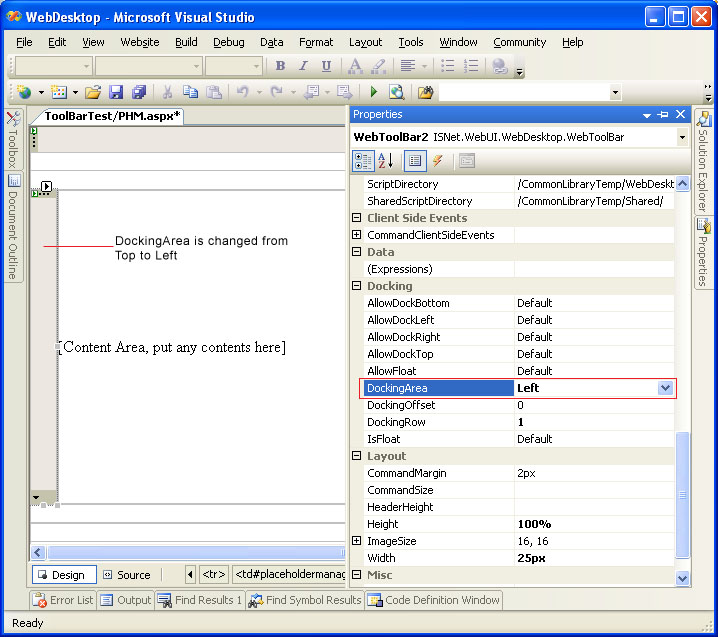
With this feature, you can quickly change a Bar's docking position by setting the DockingArea property. The PlaceHolderManager system will detect on the changes and automatically move the Bar to the designated position without affecting the content of the PlaceHolderManager or other bars.
The following screenshot shows a ToolBar which DockingArea changed from Top to Left position.
Benefits
The following is a list of top benefits introduced by PlaceHolderManager designer:
- Significant developer's productivity gains through rich and interactive PlaceHolderManager.
- Reduced lines of codes required to program the Page with the elegant architecture of PlaceHolderManager which used table system instead of Template.
- Reduced learning curve with the ease-of-use since the interactive features are similar to WinForm development experience.
- Reduced overhead in Page's maintenance when required at the future development phase.