


Introduction
HighClarityDesktop is the main technology behind everything found in WebDesktop.NET. It is the technology enabling high end functions related to Windows management, such as the capability to perform minimize, maximize, resize, move and many others. It resembles many behaviors similar to today's desktop such as Windows XP, including the behavior when WindowTaskBarButton is clicked, double clicked, mouse up & down and more, the behavior of the shortcut, the behavior of the desktop itself until the most detailed behavior of window events. With HighClarityDesktop, it then enable other components in the WebDesktop.NET to fit perfectly into DesktopManager with the same architecture, such as WebDialogBox, WebNotification and WebButton which has built-in integration right into DesktopManager.
Features
The HighClarityDesktop enables following capabilities to work in web browsers replicating almost 98% of desktop behaviors:
- Window Movement through drag and drop operation on Title bar element.
- Window Movement support in IFrame mode.
- Window Minimize, Maximize and Restore through Window Options element.
- Window Minimize, Maximize and Restore through Context Menu.
- Window Minimize and Maximize through double click on Title bar element.
- Window Minimize and Maximize through single click on TaskBar window element.
- Window Close through Window Options element.
- Window Close through Context Menu.
- Window Close through Shortcut Key (Ctrl+Alt+C).
- Window Close by double clicking on ControlBox.
- Window Resizing on eight edges through drag and drop operation.
- Window Resizing support in IFrame mode.
- Window Navigation through Shortcut Key (Ctrl+1 and Ctrl+Shift+1).
- Window Navigation through TaskBar element.
- Window Activation through double clicking on Shortcut Icon.
- Window Context Menu through ControlBox.
- Window Context Menu through right click on Title bar element.
- Window Minimize support without TaskBar.
- Window Tiling (Cascading, Horizontal and Vertical) operation through Desktop context menu.
- Window Animation support when minimize, maximize or restore operation is performed.
- Shortcut Navigation through keyboard arrow keys and single mouse click.
- Shortcut Movement through drag and drop operation.
- Shortcut Automatic Arrangement.
- Shortcut Open/Launch through keyboard key (Enter) and double click.
- Desktop Context Menu through right click on Desktop.
- TaskBar Context Menu.
- TaskBar Click for Window activation.
- Show Desktop operation through Desktop context menu.
- Show/Hide Desktop Icons through Desktop context menu.
- TaskBar Customization through TaskBarLeft and TaskBarRight template.
- TaskBar Window's Automatic Resizing.
- TaskBar Window's Automatic Tooltip when Caption's text is truncated.
 |
All above capabilities can also be performed through client side API and object model. |
More Details
The following screenshot illustrates a sample of DesktopManager with some open Windows, ContextMenu and Shorcut Icons.
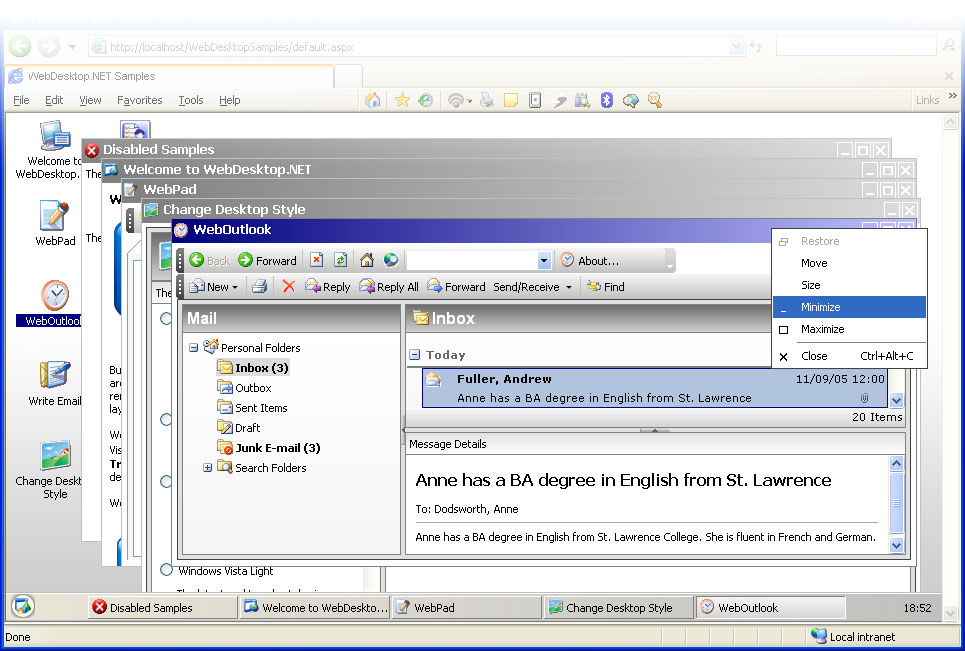
For more information on DesktopManager concepts, click on following links:
Benefits
- Easy to use, similar with desktop application's styles and behaviors.
- Enhanced user experience with richer Window-style navigation system.
- Increased productivity with better, uncluttered workspaces.
- Improved user interactions with dynamic, configurable Window state during runtime such as Move, Minimize, Maximize and more.
- Richer user personalization options.