


Introduction
To deliver a rich DesktopManager with true Desktop concepts, built-in Context Menu has been added as one of the core user interface elements in WebDesktopManager.
The built-in Context Menu in DesktopManager is built on the top of Hybrid Menu System, that is the base architecture for the runtime menu system which is used in MenuBar, ToolBar, ContextMenu and other component members which require menu functionalities.
More Details
In this release, the context menu is implemented on three objects listed in the following:
- Desktop
- Window
- TaskBar
 |
The context menu is not enabled by default. To enable context menu, simply configure the EnableContextMenu property to True. |
The context menu items automatically reflects on the object's state in context. For instance, when activated on a Window that has AllowMinimize=False, the Minimize menu item in the context menu will be disabled. The items will also dynamically reflected on the real-time object's state change. For instance, when a Window is maximized, the Size and Maximize items will be disabled.
The following shows the Context Menu functions in WebDesktopManager.

Extensibility
WebDesktopManager and entire WebDesktop.NET components provide a solid Web User Interface platform engineered with extensibility in mind. In the Context Menu area, developers can extend the menu further to meet application-specific scenarios.
It was made possible through the OnContextMenu client side event where you can handle and put your codes to perform additional logics to the menu in the context. The OnContextMenu property can be found in ClientSideEvents property which contains all available client side events of DesktopManager.
OnContextMenu event provides following parameters:
- DesktopManager ID The control ID of the WebDesktopManager instance.
- Object Type A string representing the type of the Object which activated the context menu.
- Context Object The object which activated the context menu.
- Menu Object A WebMenu object representing the activated context menu.
Following sample demonstrates how to extend the window's system context menu by adding a new About menu item.
function DesktopManager_OnContextMenu(controlId, objectType, contextObject, menu)
{
        if (objectType == "Window")
        {
                        if (menu.Items.GetNamedItem("mnuAbout") == null)
                                menu.Items.Add( new WebMenuItem("mnuAbout", "About...") );
        }
}
|
The menu system is designed to have consistency in object model between server and client side. This enables you to easily create the menu item object at either server or client side without has to learn two set of different API. To learn more about Menu's features, see WebMenu Features. |
Styles
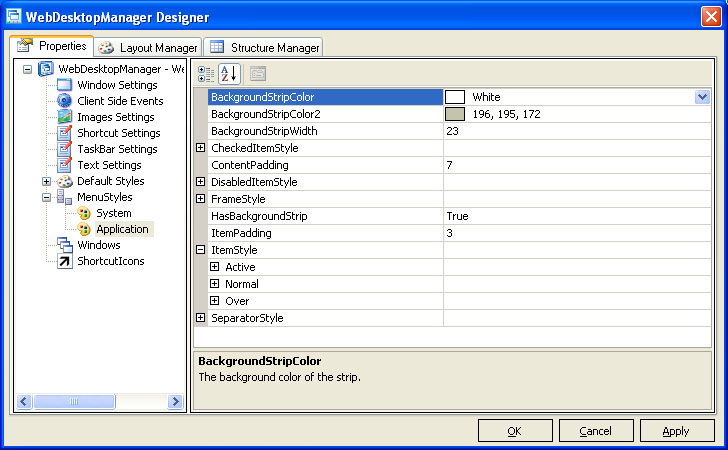
The WebDesktopManager provides two predefined style for the Menu purpose. The predefined styles are:
- System The style of the menu applied to system's context menu such as desktop or window.
- Application The style of the menu applied to WebDesktop.NET components which integrated to DesktopManager, such as PlaceHolderManager, WebToolBar or ContextMenu.
 |
The Application MenuStyle offers centralized management of the menu instances' visual styles used in entire web application. This time-saving feature enables you to easily produce consistent visual style for all integrated Menu-based controls. For more information, see Styles Inheritance model for Uniform Look and Feel concept. |
The following screenshot shows the customizable menu styles at design time.
For more information about customizable elements in Menu Styles, see WebMenu Styles.