


Introduction
WebDesktop.NET's products are designed with consistent object model and interfaces to make it possible for them to integrate and interact with each other during both designtime and runtime.
At a glance, there are 3 level of style integration which developers can take advantage to design a uniform look and feel in the entire application with minimum efforts.
The root Style begins at WebDesktopManager instance which act as "universal shell" for the rest component members. The WebDesktopManager contains master style definitions such as in the following:
- WindowSettings
The global settings which all Windows should inherit. This includes configuration of default Window behavior's values such as BorderType, AllowResize, AllowClose and so on. - WindowStyle
It includes the dynamic style definition such as Normal, Over and Active style for a Window. You can also customize the complex images of a Window in ImagesSettings when the BorderType is set to use ComplexImages. - CommandButtonStyle
The dynamic style definition for CommandButton. - CommandButtonDisabledStyle
The disabled style of CommandButton. -
MenuStyles
It includes two global styles for Menu. They are:- System
The menu style used in DesktopManager's system menu, such as in Desktop context menu (when right cliick on desktop) and in Context menu (when right click on title bar) - Application
This style definition will be used for all Menu instances in the application.
- System
 |
With the global style definition at DesktopManager level, other component members would be able to lookup for the configuration and apply it automatically during runtime. |
The second level of Style inheritance is managed by PlaceHolderManager instance. PlaceHolderManager represents the container for Bar-based items such as ToolBar, MenuBar and others. It includes the following style definition:
- WebMenuBarStyleSettings
The styles definition for MenuBar. - WebToolBarStyleSettings
The styles definition for ToolBar. - MenuStyleSettings
The styles definition for Menu. When the PlaceHolderManager is integrated to DesktopManager, all bar instances contained in this PlaceHolderManager will automatically inherit the style from DesktopManager.MenuStyles.Application
PlaceHolderManager as well as integratable component members exposed IntegratedTo property which determines the integration state of each
instance.
The following table shows the integration relations between WebDesktopManager, PlaceHolderManager and applicable component members.
| DesktopManager Level | PlaceHolderManager Level | WebDialogBox | Menu System | WebMenuBar | WebToolBar | WebButton | |
| WindowSettings | x | x | x | ||||
| WindowStyle | x | x | |||||
| CommandButtonStyle | x | x | x | ||||
| MenuStyle | x | x | x | x | |||
| ToolBarStyle | x | x | |||||
| MenuBarStyle | x | x |
|
Each atomic component such as DialogBox, ContextMenu, ToolBar and Button will seamlessly integrate to DesktopManager (when enabled via IntegratedTo property) at runtime. The style definition in control level does not required and will be ignored. |
Workflow Diagram
The previous section has outlined the main concepts of how the style inheritance works between the lowest level of components up to highest level component (WebDesktopManager). The following illustration provides an in-depth representation of the connection and process of the style integration between each level in real-world application scenarios.
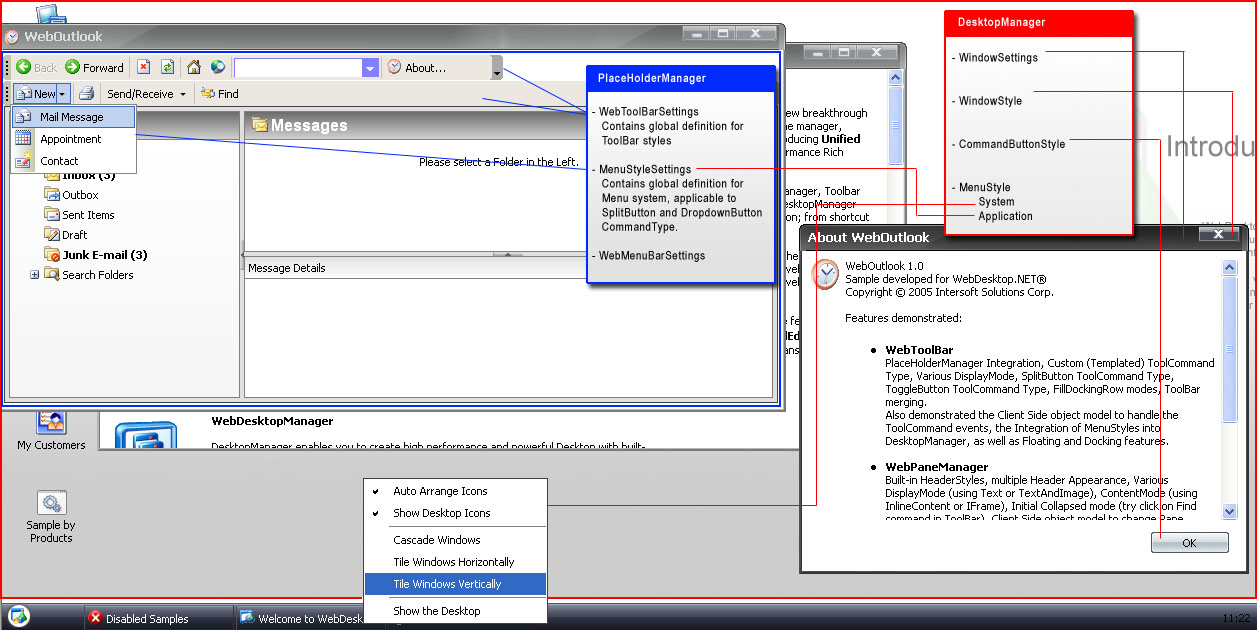
| The red markup represents a DesktopManager instance. As illustrated in above image, the atomic components such as DialogBox (see "About WebOutlook"), Button, ContextMenu and entire Menu system are applying the styles defined at DesktopManager automatically at runtime. | |
| The blue markup represents a PlaceHolderManager instance. The "Bar"-based items will obtain its styles from its PlaceHolderManager, so that there is no need to specify individual styles at Bar level. For the MenuStyle used in SplitButton or DropDownMenu CommandType, the PlaceHolderManager will determine the appropriate parent based on the Integration mode, such as when integrated to DesktopManager, it will obtain from DesktopManager's Application MenuStyle. |
Benefits
- Uniform visual styles and look&feel across entire application effortlessly through multi-level inheritance feature.
- Superior rich applications with high performance without sacrificing scalability because css class and individual instance's styles are not generated, so you can drop any number of instances on the page.
- Reduced overhead in maintenance or administration, since you can change the style definition in one central location (at either DesktopManager or PlaceHolderManager level)
- Work in harmony with WebUI StyleManager, means that the global style definition can even be defined in WebUI StyleManager and thus resulting greater flexibility and productivity.