


Introduction
WebNotification is a server control designed to retrieve new notifications from server side using object model. With the object model, it allows WebNotification to act as universal which communicates to the designated service to return the data. In short, WebNotification does not enforce or restrict any physical storage of your notifications data, or where you would like to retrieve it from.
You can use WebService (asmx) or WebForm page (aspx) as the primary data source provider for WebNotification control.
More Details
WebNotification communicates with a WebService or WebForm page provider through asynchronous call (a.k.a. AJAX) which is based on WebFlyPostBackManager component.
The following diagram shows the WebNotification control life cycle and how it works.
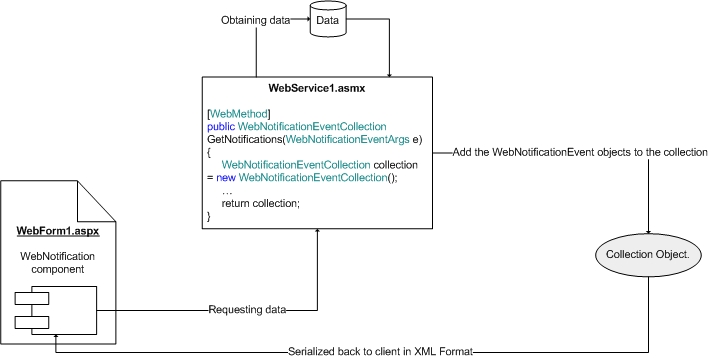
As illustrated in above diagram, WebNotification control begins its life cycle by requesting data from WebService. The GetNotifications function will then execute the contained codes and add new WebNotificationEvent object to the collection when data existed. Finally, the collection is returned from the function. The collection object will then serialized back to the client as XML data and processed internally by the WebNotification control.
When the collection contains one or more WebNotificationEvent objects, the notification popup window will be displayed in the client's screen. The text, image and the caption text of the notification will be based on the data provided in the WebNotificationEvent object which passed from the server side.
With this architecture, developers no longer being restricted to use the same WebForm page for the notifications data retrieval, which will result in slower performance and bottleneck because of the normal page lifecycle execution and ineffective non-reusable codes.
Object Model
The following diagram shows the object model used by WebNotification control during retrieval process.
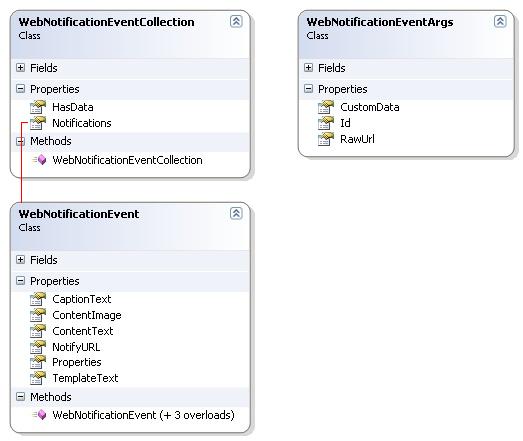
The WebNotificationEventArgs object is constructed internally at client side and passed into the function as parameter value. It is used to provide the current context of the WebNotification caller, such as the RawUrl of the WebForm page which invokes the service, or the Id of the WebNotification which in charge calling the service.
The WebNotificationEvent object is the central notification data that contains information about an event. As seen in above diagram, the object contains information such as the CaptionText, NotifyURL and so on; which provided by the developers. The information provided in the object will be automatically retrieved by the WebNotification control in the client side for the end user notification display process.
UI Elements
The WebNotification component supports fully customizable styles for most of the UI elements. The following diagram shows you the WebNotification's UI elements in details, so that you can easily customize the style for the elements you desired.
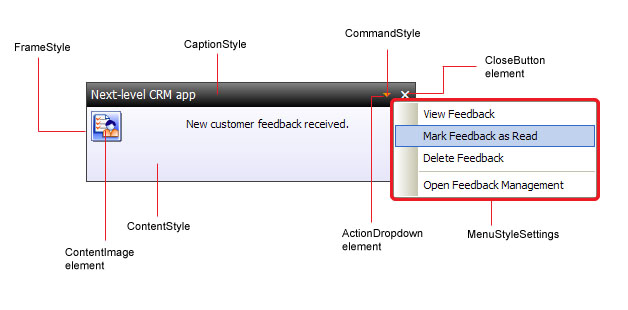
With this flexibility, WebNotification component is not only powerful in the term of architecture and object model, it also offers fully customizable styles for most of the elements as described in above diagram.
 See Also
Related Topics
{Overview}
{Features}