


Introduction
One of the most essential requirements in today's Rich Internet Applications (RIA) and web applications is the extensive keyboard supports which allowing users to easily invoke commands and access to parts of User Interface element easily and quickly through keyboard. The key access support was previously available in desktop-applications only since popular desktop such as Windows(r) has provided comprehensive API and integrated runtime environment for this specific keyboard access features. Keyboard access is also one of the standards required in Graphical User Interface (GUI) applications.
WebDesktop.NET comes with a wide variety of keyboard access support, called SmartKeys technology. SmartKeys enables extensive keyboard access support to your web applications in the same way and manner as in desktop-based applications.
More Details
SmartKeys technology is tightly integrated with WebDesktop.NET runtime system such as WebDesktopManager, WebToolBar, WebMenuBar and WebContextMenu. SmartKeys consists of behaviors and functionalities in the following:
- AccessKey invocation by pressing Alt, followed by the designated AccessKey. AccessKey is typically a character appearing in Underline style.
- Override browser-level accelerator keys. For instance, you can configure a "File" MenuCommand and set its AccessKey to "f". At runtime when Alt+F is pressed, the File MenuCommand will be invoked instead of showing browser's File menu.
- True focus behavior. The command access through accelerator key will not affect the current input's focus, so you can continue typing and editing after you cancel the operation of the invoked command (for instance, press Esc to cancel the displayed menu).
- Cross frame. The keyboard access will work properly regardless of where the current focus is.
- Tight integration with WebDesktopManager. When the controls with SmartKey-enabled are hosted in DesktopManager instance, the keyboard access will be scoped only to the current active window, without affecting AccessKey definition in other WebDesktopWindow.
- ShowFocusBorder feature. This feature offers comprehensive accessibility support as defined in US Section 508, which enables users to navigate between items by pressing Tab or Shift+Tab.
- When ShowFocusBorder is enabled, pressing Enter or Space will invoke the command of active index.
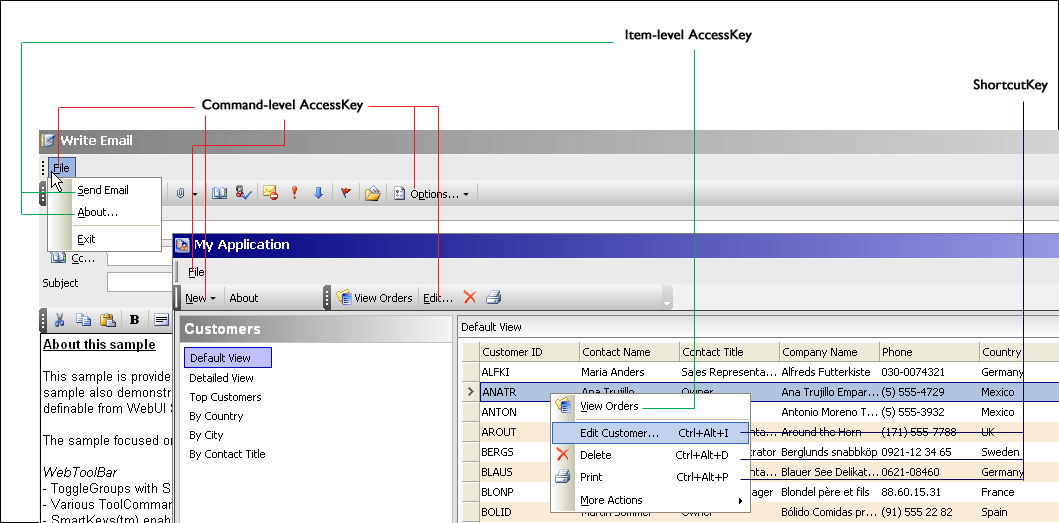
- Item level AccessKey. For better flexibility and customization, you can define AccessKey of item level commands individually.
- Built-in navigations for Menu system. When a Menu is shown, you can start navigating its items and submenu by using arrow keys, without requiring additional effort for focusing it.
- Shortcut AccessKey. Regardless of where your current input is, you can easily access to a command by pressing the ShortcutKey associated to the command.
The following illustration represents a brief picture of the SmartKeys features.
Supported Products
This technology applies to following listed products:
- WebToolBar
- WebMenuBar
- WebContextMenu
- WebTab
Benefits
- Increased application accessibility through industry-standard keyboard access supports.
- Maximizing the value of your application by adding comprehensive accessibility supports defined in US Section 508.
- Enhanced user experience by allowing entry users to easily and quickly access to commands using keyboard, in the same way and manner as in desktop GUI applications.
 |
Some of keyboard access features in SmartKeys are not available in browsers other than Internet Explorer due to limitations of API and browser capabilities. For Mozilla-browsers, these features will be automatically supported in upcoming Mozilla 3.0 browsers. More information about Mozilla 3.0 keyboard supports, please see Accessible DHTML |