


Objective
WebExplorerPane has a capability to handle some ClientSide Events. This tutorial will show the list of ClientSide Events available and how to invoke them respectively.
- Refer to Creating Simple ExplorerPane to create a basic ExplorerPane.
- Open WebExplorerPane Property Window.
- At ClientSideEvent Category, fill all the EventHandler like following
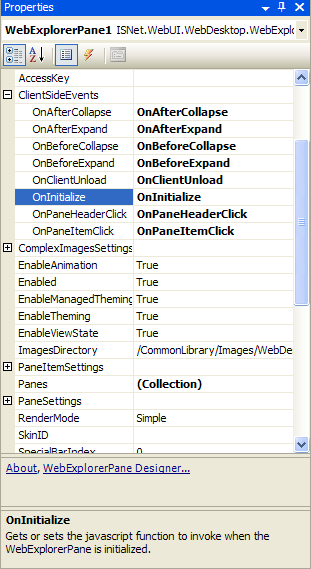
- Create JavaScript function that corresponds to each EventHandler
Script  Copy Code
<script type ="text/javascript">
function onAfterCollapse()
{
alert("After Collapse");
}
function onAfterExpand()
{
alert("After Expand");
}
function onBeforeCollapse()
{
alert("Before Collapse");
}
function onBeforeExpand()
{
alert("Before Expand");
}
function onClientUnload()
{
alert("Client Unload");
}
function onInitialize()
{
alert("Initializing");
}
function onPaneHeaderClick()
{
alert("Pane's Header is clicked");
}
function onPaneItemClick()
{
alert("Pane's Item is clicked");
}
</script>