


Objectives
WebNavPane has some ClientSide Events. This tutorial will show what are the ClientSide Events and how to handle it.
Following are the steps :
- Refer to Creating NavPane WithImages to create a simple WebNavPane.
- Open WebNavPane Property Window
- At ClientSideEvent Category, fill all the EventHandler as follows:
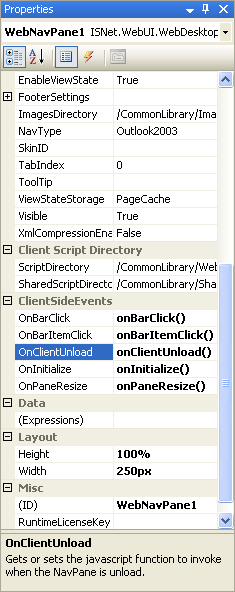
- Create JavaScript function that correspond to each EventHandler.
Script  Copy Code
<script type ="text/javascript">
function onBarClick()
{
alert("NavBar is Clicked");
}
function onBarItemClick()
{
alert("NavBar's Item is Click");
}
function onClientUnload()
{
alert("Client Unload");
}
function onInitialize()
{
alert("Initializing");
}
function onPaneResize()
{
alert("Resizing Pane");
}
</script>
 See Also
Related Tutorials
Creating Simple WebPane Layout
{Creating NavPane With Images}