


Objectives
You can customize the caption appearance of a WebPane in WebPaneManager. All you need to do is set the WebPane CaptionDisplayMode property. The value of the property is an enumeration of type AllowCollapse which values are
| C# |  Copy Code Copy Code |
/// <summary> |
|
The last enumeration value enables you to write your own implementation how the Caption should be rendered. You can write the implementation inside the <HeaderTemplate> tag under the Source View in the Design Surface.
- You can access that property during DesignTime either by right clicking the WebPaneManager and choosing WebPane Designer or WebPane Advanced Designer.
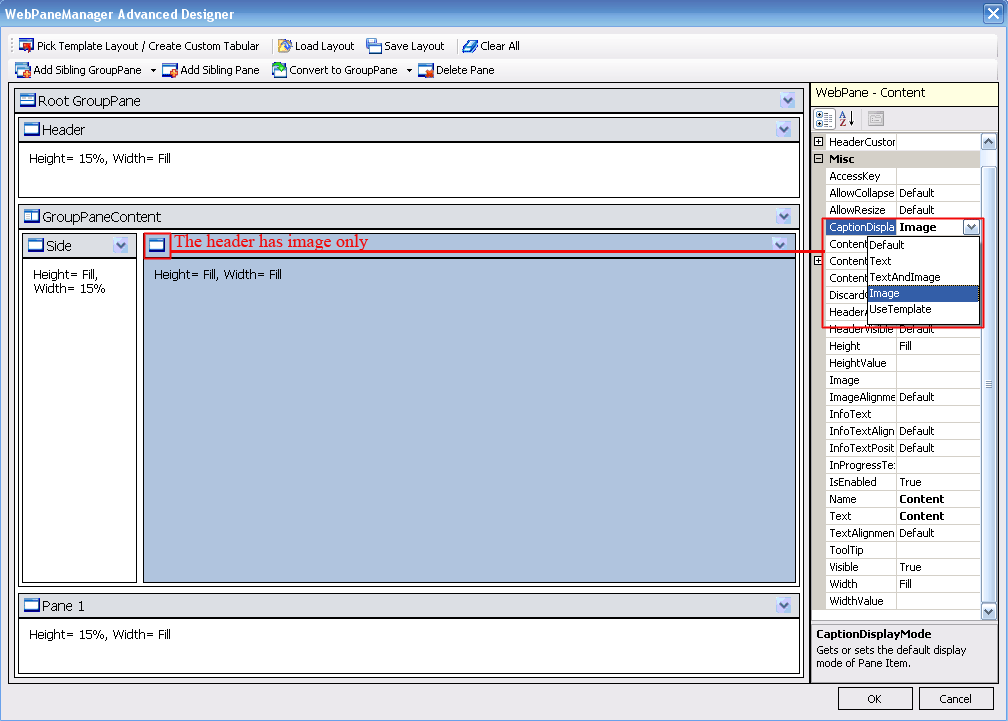
- In the snapshot below, the Pane Content CaptionDisplayMode property is set to Image. It makes the image of the
Pane will appear at Run-time. Therefore, no Header Text will be visible.
 See Also
Related Tutorials
{Creating Simple Layout}