


Other than providing the user with common predefined Layout, another feature which is Custom Tabular is also provided, using this feature, user can simply create Tabular Panes. This is extremely useful especially in situations where you want to create a large matrix of tabular cells.
Simply by moving the Radio Button to Custom, the GroupBox TabularMode will be activated and you will be able to create tabular panes conveniently. The interesting thing to notice here is there are 2 types of grouping which is Horizontal or Vertical. When Horizontal is selected the Pane will be grouped Horizontally since a GroupPane can only be either Vertical or Horizontal.
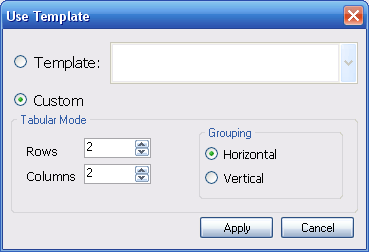
When you have made your selection, simply click apply and you will be returned to the main designer form and see your Tabular Panes generated already there.