


Overview
As has been known Page Layouting using table is very famous in Web design. Using tables, developer then divide their page into several categories and sub-categories such as Header, Side, Content ,Footer and so on. Later though a new layout approach is introduced in the form of a concept famously known as "Tableless CSS", where table is replaced by <DIV> and using CSS style. Though this new approach brings advantages unavailable using traditional approach, table is still an unseparateable part of layouting. It is the easiest and most convenient way to layout your page.
The intention to develop a PaneManager editor comes from the limitation of available editors. Developers usually create their own layout from scratch which is very troublesome especially when complex structure is involved (table inside table and so on). Another problem is about the calculation of each TableData's size (more well known as <TD> in HTML) where they can't conveniently set the dimension of each <TD>. In Pane Manager those sort of thing are no longer a problem where different types of Dimension Unit is supported such as %, px, and even Fill.
PaneManager editor is used as a tool to quickly create and modify pane layout. There are 2 main types of objects in PaneManager which are WebPane and WebGroupPane. WebPane are the panes used to put contents. On the other hand WebGroupPane contains a collection of Panes with either Horizontal or Vertical Orientation.
PaneManager editor also comes with a set of predefined templates where developers can quickly select the intended layout and do further modification to the layout as needed. It also has splitter capability to resize the dimension of two associate Panes during UI Design and ContextMenu capability. This is a complement to the PropertyGrid provided in the WebPaneManager Advanced Designer where the stage is not only used for displaying layout but also for UI Interaction.
Pane Manager UI Introduction
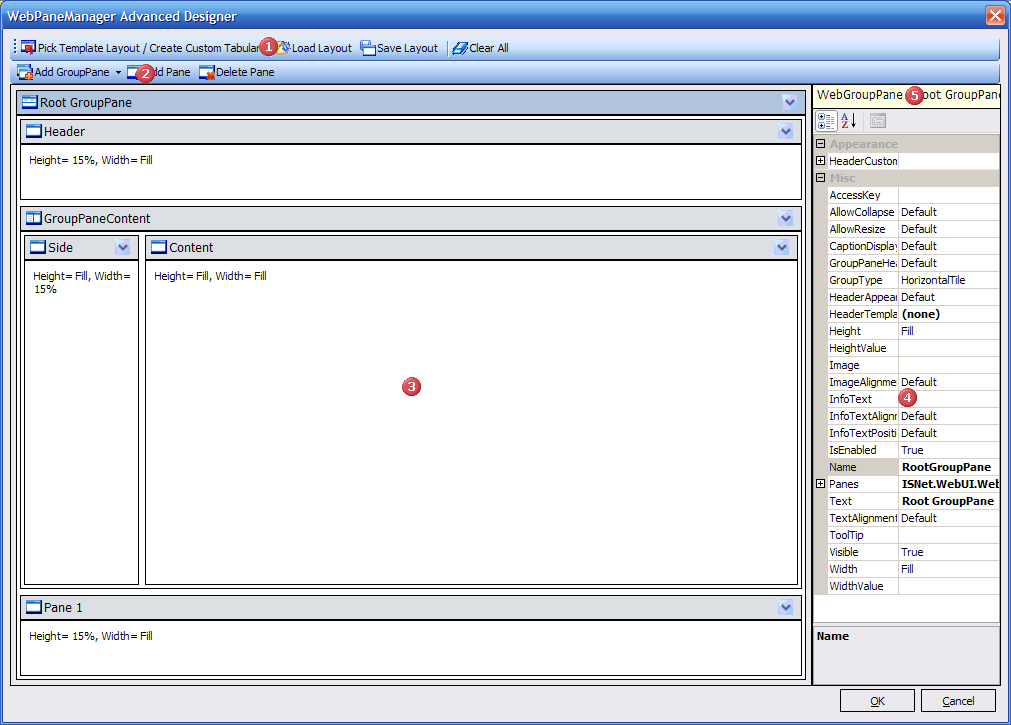
 ToolStripMenu
This toolstrip is used for navigation in PaneManager Editor
 ToolStripActions
This toolstrip is for action related
 Stage
StageThis is the stage where the panes are organized.
 SelectedPane PropertyGrid
This is the PropertyGrid listing all properties of currently selected pane.
 SelectedPane information
This is a label defining the type and name of currently selected pane.