


Drop Control Integration means special drop features and extra behaviors can be added to the specific Intersoft's controls. For instance, when the WebExplorerPane (version 2.5 or later) integration is enabled, the drop behavior will automatically be added to the WebExplorerPane controls in the page.
In this release, the Drop Control Integration supports the following Intersoft's components:
- WebExplorerPane
WebExplorerPane component, as part of WebDesktop.NET family can be applied as a drop control in WebDragDropExtender through special integration feature. This means you can drag an object/element and drop it to the pane item of the WebExplorerPane control.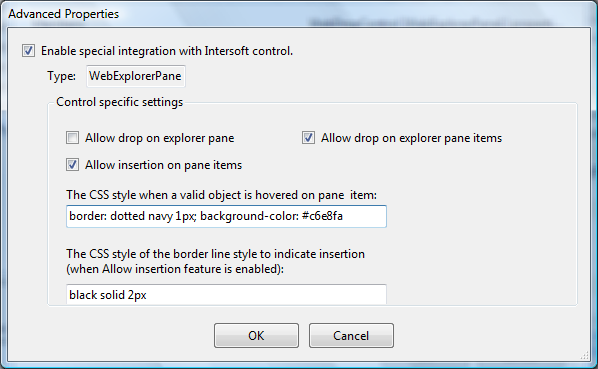
There are several control specific settings for WebExplorerPane: -
-
Allow drop on explorer pane
When checked, you can drop objects onto the pane element of the control. -
Allow drop on explorer pane items
When checked, you can drop objects onto the pane items of the control. This is the most popular feature, so that you can perform moving or copying upon successful drag-drop. -
Allow insertion on pane items
When checked, you can drop objects between one item and another. In common user interface operation, the objects are usually added into the list around the insertion point. -
Styles
You can customize several styles used during the drag-drop process such as the style when a valid object is hovered onto a pane item, or when the insertion point needs to be displayed.
-
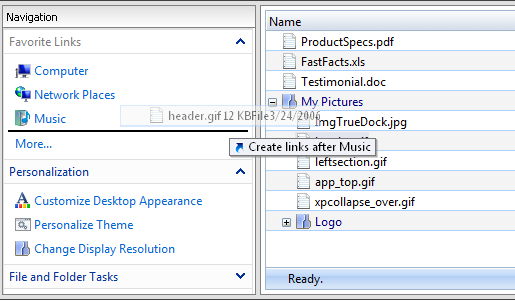
- The following screenshot shows the WebExplorerPane in action while integrated to WebDragDropExtender.
- WebNavPane
WebNavPane is a navigation pane server control and the replica of Outlook navigation pane. WebNavPane component is part of WebDesktop.NET family.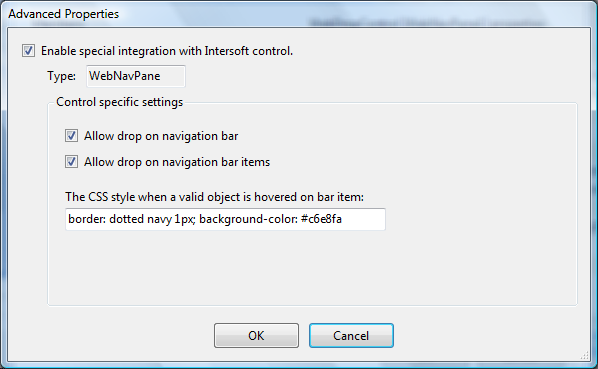
Similar to WebExplorerPane, WebNavPane integration also exhibits control specific settings such as allow drop on navigation items and style customization.

When Allow drop on navigation bar is checked, the WebNavPane control will accept objects on the visible bars. In addition, it will also accept objects on the collapsed bars located in the footer part of the WebNavPane control. -
WebDesktopManager
WebDesktopManager is the most essential component in WebDesktop.NET family providing a visually-compelling user interface that simulates desktop shell similar to Windows or Mac OS.
WebDragDropExtender plays an important role to deliver rich user experiences to Web application with its robust drag-drop capability. Combined with WebDesktopManager, these two components together bring a whole new innovation and possibility in providing enhanced Web user experiences. With this objective in mind, we have specifically focused on the WebDesktopManager integration as drop control in order to deliver a phenomenal, magnificent user experiences.
The following illustration describes the special integration features available for WebDesktopManager.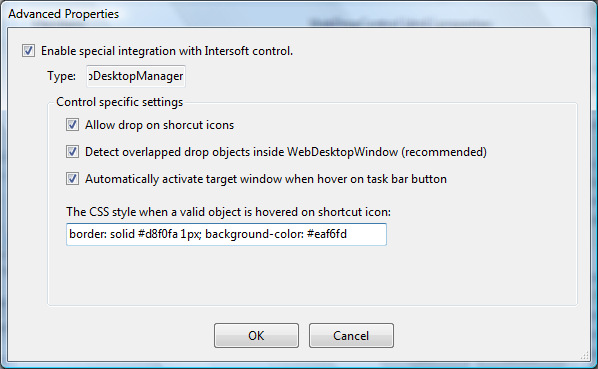
The control specific settings for WebDesktopManager in details are: -
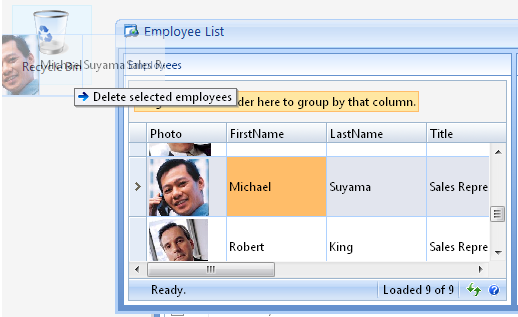
The following screenshot shows the WebDesktopManager in action while integrated to WebDragDropExtender.
-
Allow drop on shortcut icons
When checked, you can start to drag objects and drop it into shortcut icon elements. To give more control over the drag-drop behavior, you can handle the OnDragOver and OnDragDrop client side event. For samples, please refer to Reference Samples for Intersoft Control Integration. -
Automatic window activation when hover on task bar button
This exciting feature allows you to drag some items from a WebDesktopWindow to another invisible (minimized or overlapped) WebDesktopWindow by hovering on the application's task bar for 1 second. It will then activate/restore the respective application's window so you can drop the items into the WebDesktopWindow. This behavior is common in popular desktop such as Windows or Mac OS. -
Robust context-sensitive drag drop architecture
WebDragDropExtender is capable to detect overlapped drop objects in pixel-perfect sensitivity. For instance, if a drop object is currently overlapped by another window, it will still allow drop onto its partially visible region.
-
 See Also
Tasks
{Walkthrough: Creating Outlook® Style Drag and Drop Application}
{How-to: Enable special drag integration for WebGrid control}
{How-to: Enable special drop integration for WebDesktopManager control}
{How-to: Disable Caching for movable drop objects}
Other Resources
{Integration for Drag Control}
{Reference Samples for Intersoft Control Integration}