


Drag Control Integration means special drag features and extra behaviors can be added to the specific Intersoft's controls. For instance, when the WebGrid (version 5.0 or later) integration is enabled, the drag behavior will automatically be added to the WebGrid controls in the page. Based on the configuration, you can choose what objects/elements in WebGrid to be dragable.
In this release, the Drag Control Integration supports the following Intersoft's components:
- WebGrid.NET Enterprise 5.0 or later
To utilize the drag control integration on WebGrid, please click the editor button of the AdvancedProperties property. The editor looks like the following screenshot.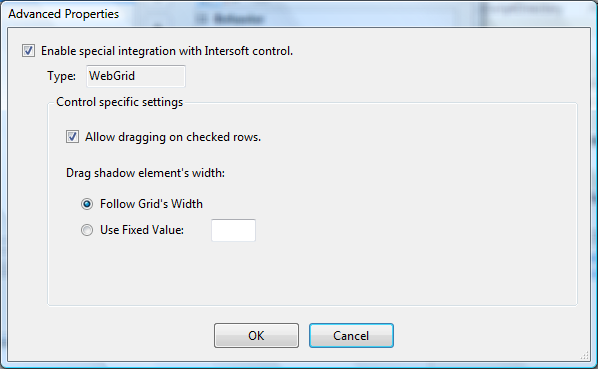

The Advanced Properties Editor will automatically be loaded based on the Type of current assigned ControlID. Therefore, ensure you have assigned the ControlID to one of the supported server control before clicking on the Advanced Properties Editor.
There are several advanced features related to WebGrid Integration:
- Sophisticated drag support for WebGrid.NET Enterprise 5.0+
WebDragDropExtender includes a custom interface for extended programmability in order to control all drag drop behaviors in a consistent and structured manner. WebGrid implemented the CustomDragInterfaceBase client interface to provide powerful drag behaviors in WebGrid control. - Vista style drag visual hints
With this feature, you can check on several checkboxes in the mail items, and then notice the drag visual hint will use a special Vista style indicator. The number of dragged items is shown automatically in the visual hint.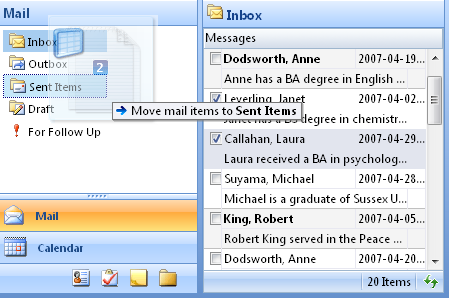
- By default, selected row will be automatically dragable when integration is enabled. Before you can drag a row, you should select it first, then drag from the boundary of the selected row.
- Use Fixed Width for Shadow Element
By default, when you drag a selected row, the transparent shadow element will use the same width as the Grid's width. However, this behavior might not be suitable when the Grid has large width. You can set the Grid to use fixed width, eg. 200px, for the shadow element's width.
 See Also
Tasks
{Walkthrough: Creating Outlook® Style Drag and Drop Application}
{How-to: Enable special drag integration for WebGrid control}
{How-to: Enable special drop integration for WebDesktopManager control}
{How-to: Disable Caching for movable drop objects}
Other Resources
{Integration for Drop Control}
{Reference Samples for Intersoft Control Integration}