


This walkthrough shows you how to create Outlook style drag and drop application.
During this walkthrough, you will learn how to do the following:
- Use WebDragDropExtender to allow the drag grid row dragged to drop WebNavPane.
 Prerequisites
In order to complete this walkthrough, you will need the following:
- Visual Studio 2005 Application.
- Intersoft controls WebGrid and WebDesktop
Step-By-Step Instructions
To create an Outlook Style Drag and Drop Application.
- Launch Visual Studio.NET 2005.
- Open an Outlook sample. (Reference Sample: WebGridSamples/Outlook2007Page.aspx).
- Drag WebDragDropExtender into the WebForm.
- Click on WebDragDropExtender instance and press F4.
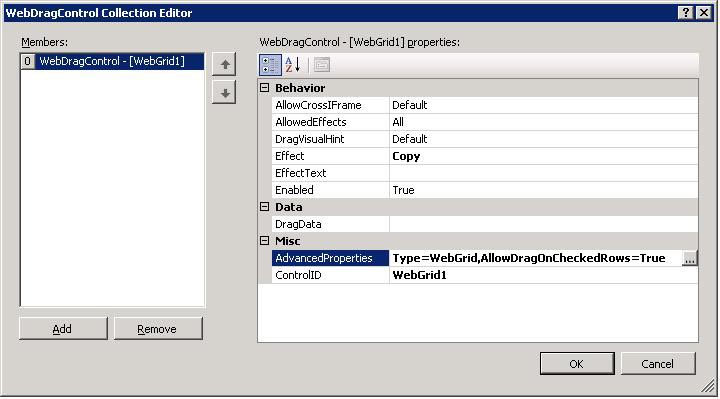
- On DragControls property, click the (collection) button to open WebDragControl Collection Editor. You can set which panel will be the DropControl.
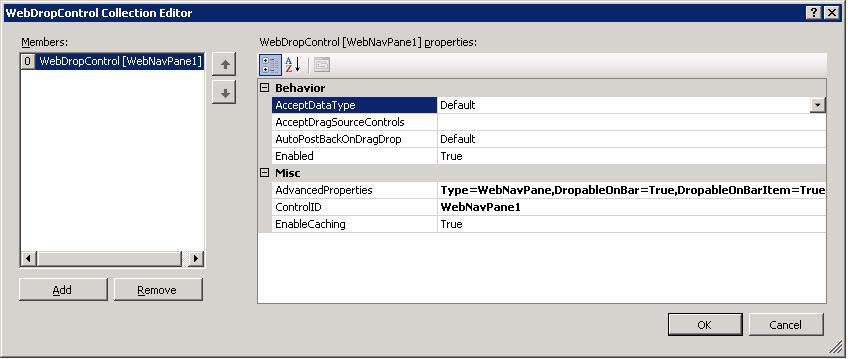
- On DropControls property, click the (collection) button to open WebDropControl Collection Editor. You can set which panel will be the DropControl.
- Create 2 clientside events from your WebDragDropExtender, which are onDragDrop and onDragOver and create the functions as following:
JavaScript  Copy Code
function DragOver(controlId, e, dropObject) { if (dropObject.IsSubObject) { /* get the context of the sub object being hovered */ var dropItem = dropObject.SubObjectContext; /* if the hovered item's type is WebNavBar */ if (dropItem.ItemType == "WebNavBar") { /* get the real WebNavBar object being hovered */ var bar = dropItem.ItemObject; /* set effect text based on hovered item to give feedback to user */ switch (bar.Text) { case "Mail": e.EffectText = ""; break; case "Calendar": e.EffectText = "Add mail items to calendar."; break; case "Contacts": e.EffectText = "Add sender to contact."; break; case "Tasks": e.EffectText = "Create new task for the selected mail items."; break; case "Notes": e.EffectText = "Add mail items to notes."; break; case "Journals": e.EffectText = "Add mail items to journal."; break; } } else if (dropItem.ItemType == "WebNavBarItem") { var navPane = ISGetObject("WebNavPane1"); var activeBar = navPane.GetActiveBar(); var dropItem = dropItem.ItemObject; if (activeBar.Text == "Mail") { var activeItem = activeBar.GetActiveBarItem(); if (activeItem.Text == dropItem.Text) { e.Effect = ISDragDropEffects.NotAllowed; e.EffectText = "Cannot move mail items to the same folder."; } else { e.Effect = ISDragDropEffects.Move; e.EffectText = "Move mail items to " + dropItem.Text + ""; } } } } else { e.EffectText = ""; } } function DragDrop(controlId, e, dropObject) { if (dropObject.IsSubObject) { /* get the context of the sub object being hovered */ var dropItem = dropObject.SubObjectContext; /* if the hovered item's type is WebNavBar */ if (dropItem.ItemType == "WebNavBar") { alert("Perform action such as show the create new '" + dropItem.ItemObject.Text + "' dialog box."); } else { if (e.Effect == ISDragDropEffects.Move) { var np = ISGetObject("WebNavPane1"); var activeBar = np.GetActiveBar(); var activeItem = activeBar.GetActiveBarItem(); /* We need to serialize DragData to xml first because object can't be send as event argument. This process optimizes the data sent to the server during AJAX callback for best performance. */ var s = "<dragdata>"; s += "<currentview>" + activeItem.Text + "</currentview>"; s += "<targetview>" + dropItem.ItemObject.Text + "</targetview>"; s += "<maildata>"; /* loop through the dragged mail items from WebGrid notice that e.DragObject.Data is WebGridDragData object. */ var draggedRows = e.DragObject.Data.Rows; for (var i=0; i<draggedrows.length/>"; } s += "</maildata>"; s += "</dragdata>"; e.data = s; /* proceed with move mail items - see OnDragDrop event in server side */ return true; } } } return false; }
- In WebGrid, add 2 events which are onBeforeResponseProcess and onAfterResponseProcess.
JavaScript Copy Codefunction ReinitializeDragControls() { setTimeout(function() { /* this function needs to be called when the Grid is refreshed due to AJAX callback */ var extender = ISGetObject("WebDragDropExtender1"); extender.ReinitializeDragControls(); }, 100); } function BeforeRefresh(controlId) // taken from onBeforeResponseProcess { /* unload drag controls to free memory before the Grid is refreshed */ var extender = ISGetObject("WebDragDropExtender1"); extender.UnloadDragControls(); } function AfterRefresh(controlId) // taken from onAfterResponseProcess { ReinitializeDragControls(); }
- Enable the AutoPostBackDragDrop property and set PostBackMode to FlyPostBack from the WebDragDropExtender properties.

- Run and compile the project.