


One of the most powerful features introduced by WebDragDropExtender is its ability to perform drag-drop over IFRAMEs. With this feature, you can now deliver rich Web application with sophisticated drag and drop capability beyond IFRAME limitation.
IFRAME Support Modes
WebDragDropExtender provides 2 level of IFRAME Support:
- Parent to Child
This mode also called as ChildIFrameOnly mode allows you to drag an element from parent frame and drop it to the target element inside child IFRAMEs. To get a better understanding on how it works, see the following illustration.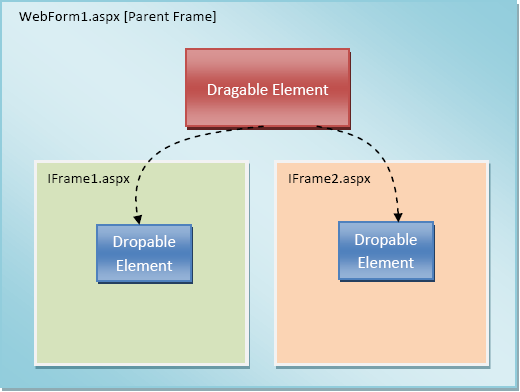
As seen in the illustration above, we can specify an element at the parent window to be dragable in WebDragDropExtender. The dragable control definition should have its AllowCrossIFrame property set to ChildIFrameOnly. Next, in the IFrame1.aspx and IFrame2.aspx, we can specify the drop elements in each Webform by creating WebDragDropExtender control. The specified drop elements will automatically be able to accept dragable elements from the parent window without additional configuration.
- Child to Child(Sibling)
This IFrame Mode allows you to drag an element from one IFRAME and drop it to other IFRAMEs (sibling) in the same page. This powerful feature opens a whole new possibility to deliver rich and sophisticated drag-drop capability that is similar to Windows® desktop application.
To get a better understanding on how it works, see the following illustration.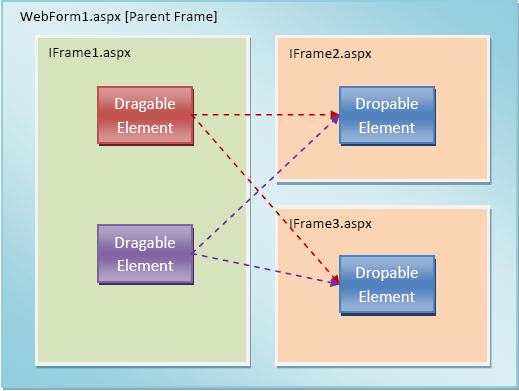
In the illustration above, the WebForm1.aspx contains three floating IFRAMEs. The left one is IFrame1.aspx, and two in the right side are IFrame2.aspx and IFrame3.aspx. The first IFRAME includes two dragable elements, which can be dropped to target element in either second or third IFRAME.

The Webform which hosts the IFRAME, needs to have at least one WebDragDropExtender instance in order for this feature to work properly, even though there is no drag control or drop control in the WebDragDropExtender.
For example, please take a look at the following ASPX markup:
Component's Tags  Copy Code
<ISWebDesktop : WebDragDropExtender ID="WebDragDropExtender1" runat="server">
<DragSettings AllowCrossIFrame="SiblingAndChildIFrame" />
</ISWebDesktop:WebDragDropExtender>
 See Also
Tasks
Walkthrough: Enabling a panel server control to be dragable across child IFRAMEs
{Walkthrough: Enabling a panel server control to be dragable across sibling child IFRAMEs}
Other Resources
{Predefined Cursor Effects}
{Automatic Transparent Shadow}
{Vista�?� Style Tooltip}
{Keyboard State}
{Auto Postback Mode}
{Use Custom Object as Data}
{Drag Data Validation}
{Integration with Intersoft Controls}