WebDragDropExtender is designed to help developers implementing sophisticated drag and drop capability in little efforts and time. When you add a server control into DragControls, you can immediately drag on the control's element when you run it in browser.
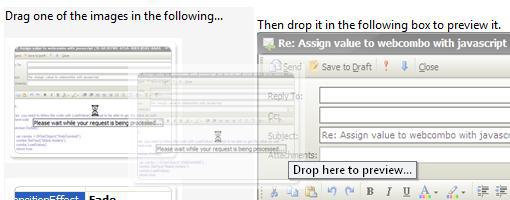
Furthermore, when you dragged the control's element, notice that WebDragDropExtender automatically creates a transparent shadow of the original element as the drag visual hint/indicator. This feature enables end users to easily recognize the dragged objects and ensuring they are grabbing the correct objects before dropping it to the target objects.
 |
Drag and drop has become a very important user interaction in an application since the invention of GUI Desktop such as Windows®. It simply enables end users to perform quick data entry with minimal efforts, and hence increasing user's productivity. WebDragDropExtender and its automatic transparent shadow feature provides a visually compelling drag and drop capability which reducing the possibility of data entry errors as well as reducing data entry complexity. |
WebDragDropExtender provides two predefined drag visual hints:
- MakeTransparent, which is the default value.
- SimpleIndicator
This mode allows you to create traditional drag visual hint similar to those in older Windows® applications. The simple indicator simply shows a small rectangular hint below the mouse pointer.
The MakeTransparent mode creates transparent shadow similar to the following image.