


Introduction
One of the most challenging tasks in developing scalable web application is providing rich visual style design in consistent fashion across the entire web forms in the application. Designing the style that is reusable and consistent in an application can oftenly become a painful task for developers because of the insufficient tools that has specific features to address this problem. Most of the times, developers need to spend a lot of time and efforts in only designing the style and appearances of the web form, while the design task should actually be done by other team in Design division. That had caused a major impact to developer's productivity and other efficiency areas.
Intersoft has provides several solutions in the previous version of the WebUI.NET Framework (v1.0 and 2.0) listed in the following:
- Xml-based Layout Manager
The Layout Manager is a feature implemented in most of Intersoft's component designer. It is only accessible through design time in Visual Studio IDE. By using Layout Manager, you can easily save a style configuration in a xml-based Layout File and later apply it to other control's instances. Although it provides many time-saving features for style reusability, it does not allow you to design the style outside of Visual Studio IDE.
- Layout API
Instead of applying a Layout on design-time using Layout Manager mentioned above, Intersoft has also provided comprehensive Layout API to allow developers to load and save a Layout dynamically at runtime. The Layout can be loaded from either a Stream object or a file path. The Layout API provides flexible and powerful way for developers to create extensible and personalized visual styles. However, it requires a lot of programming efforts in order to achieve consistent sitewide visual styles.
WebUI StyleManager
In this release of WebDesktop.NET, Intersoft offers a more solid tool for addressing this issue with the availability of WebUI StyleManager. The StyleManager lets design tasks to be done by proper division instead of having developers to do it. This provides a more robust and scalable teamwork while building enterprise application where designers can now work with developers in parallel manner.
With the clear separation between designing and developing tasks, it enables the application to be built with better organization which allows better maintenance in the future when enhancements or adjustments are required.
Concepts
The StyleManager is a standalone desktop (WinForm) application built on the top of WebUI.NET Framework 3.0 and .NET Framework 2.0 enabling a designer to add, edit or remove themes in a web application. It also provides the built-in capability for designers to visually create or edit the style of any supported Intersoft's components as well as previewing and deployment of the theme to production server easily.
The StyleManager can be installed independently on a computer without requiring Visual Studio development environment. It however requires following software to be installed:
- Microsoft .NET Framework 2.0
- IIS (for previewing purpose)
- Intersoft WebUI.NET Framework 3.0
 |
The "theme" referred above does not use ASP.NET 2.0's theming architecture. It used Intersoft's own Theme Architecture which enables better theming management architecture in the term of flexibility and features. |
The following is a screenshot of WebStyleManager.
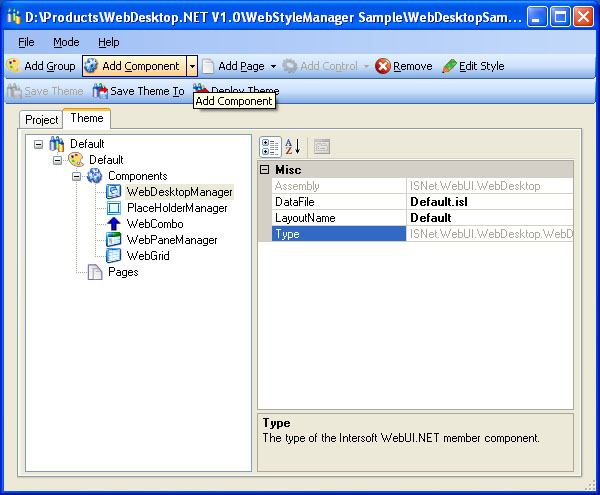
For more information about StyleManager and its features, see WebStyleManager Features.
For more information on how the StyleManager can be used in conjunction with Theme architecture and the Deployment concepts, see The Orchestration of Theme Architecture, StyleManager and Deployment.
Benefits
WebUI StyleManager introduced numerous benefits for both designers and developers. Some of the benefits are:
- Improved developer's productivity by focusing on application development and leaving all design tasks to designers.
- Better teamwork scalability and resources utilization with the clear separation between designing and developing tasks.
- Reduced administration and maintenance complexity with the easy deployment mechanism.
- Faster time of application implementation since designers can now work in parallel with developers.
- Time saving with the easy to use application interface.