


WebPaneManager component comes with rich designtime support that take advantage of new Visual Studio 2005 designer architecture. Combining with Intersoft's unique ClickAndEdit and ClickAndSelect technologies, WebPaneManager brings you a new level of design experience with richer WYSIWYG editing mode.
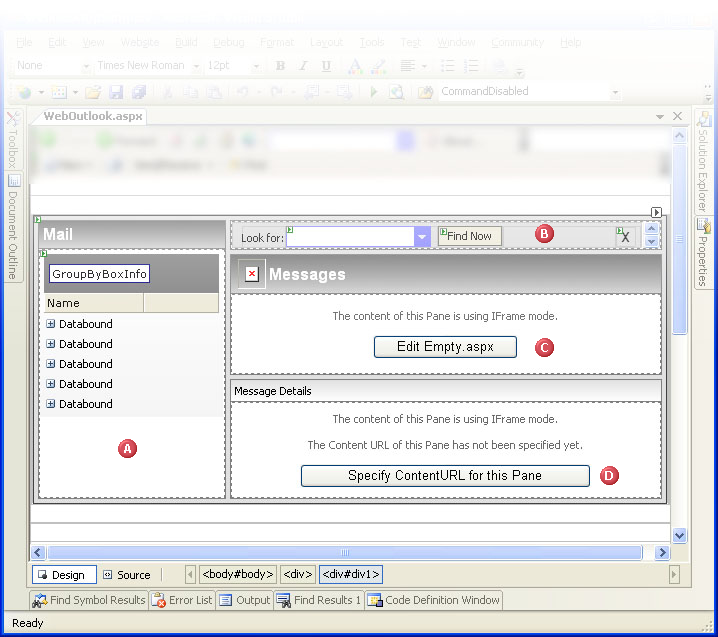
Image 1 - The design time environment of WebPaneManager in Visual Studio 2005
 |
The Mail WebPane is configured to use InlineContent mode. When using this mode, content of the Pane can be directly edited by clicking on the "dashed-border box". You can put any controls inside the Content, including server side controls, html contols, user controls and so on. The Pane with InlineContent mode will be persisted in ContentTemplate property seemlessly. The ability to click on the region and edit inside the component directly is known as ClickAndEdit technology. |
 |
The Find WebPane used InlineContent mode. As illustrated in above image, it can contain html table with WebCombo.NET and WebButton.NET. Scrollbar will automatically appear when the content exceeds the boundary of the dimension. |
 |
The Messages WebPane is configured to use IFrame content mode. When the ContentURL is already specified, a Button "Edit [Page]" will appear in the center of the Pane. This is called ClickAndSelect technology, where you can interact with the design time object directly inside the component region. When the Button is clicked, it will open the specified WebForm in Visual Studio 2005. |
 |
The MessageDetails WebPane is configured to use IFrame content mode. When there is no ContentURL specified yet, the Button "[Specify ContentURL]" will appear to let you easily specify the ContentURL for the specified Pane. An URL Picker DialogBox will appear as soon as you click on the Button, and accept the changes in HTML once applied. |
 |
All Intersoft's components come with rich designtime experience enabling you to be more productive in designing and developing rapid web applications. The rich designtime experience includes the visual designtime styles and appearances, behaviors and layout which offer WYSIWYG representation of the runtime display. Furthermore, the designtime experience is even more enhanced and improved in Visual Studio 2005 with the introduction ClickAndEdit and ClickAndSelect technologies. |