Following is the list of features available in WebFlyPostBackManager control.
- Invoke mode
By default, the component will operate in asynchronous mode. The asynchronous mode is the preferred operation mode since it delivers smoother user experience by performing actions in the background. However in some scenarios, you may want to use synchronous invocation. You can change the operation mode to synchronous by setting Asynchronous property to False.
- Call to WebService method
The component offers the capability to invoke a function in WebService page (asmx) right out-of-the-box. The protocol for the WebService invocation used SOAP protocol which is today's standards used by XML Web Services application.
WebService service type is recommended for application that require open API and standards implementation. To use WebService service type, simply set the ServiceType property to WebService value.
- Call to WebForm method
In addition to the WebService method invocation, the component also offers the built-in capability to invoke WebForm-based pages (aspx). The callable functions in the WebForm required to have [WebFlyPostBackMethod()] attribute.
WebForm service type is recommended for application that does not require to be exposed as public API. This service type has some advantages compared to WebService type such as in term of performance and security. It also has the capability to handle wider data types, including Intersoft's proprietary collection objects.
- Automatic meta data loading
This feature tells the component to perform automatic meta data loading when the component is initialized successfully in client side. The automatic meta data loading is useful so that you can call the exposed methods directly in the client side.
For instance, you may have the codes in the following without metadata loaded:
fpbManager.Invoke("FunctionA", param1);
With metadata loaded, you can call the function directly instead of above code:
fpbManager.FunctionA(param1);
- Automatic event wiring
By default, developers would need to attach the function name manually to the client side events of the component. For instance, setting the OnResponseSuccess property to "DoResponse" will have the DoResponse function called on every success calls. However, you would need to perform some conditional checking against the methodName because the single WebFlyPostBackManager component can be used for any number of different method calls.
By enabling the AutoEventWireup, you do not need to attach to the OnResponseSuccess client side event. The component runtime will automatically look for the prefixed function name and call it if it existed. See following sample codes.
Expand Sample

As shown in the sample codes above, the component will automatically call specific function name having this format: [component ID]_On[method name] - Error and time-out handling
The component implements error handling in automatic form. That means the error thrown during FlyPostBack call or during client side processing will not be directly shown to users. In other words, any exceptions thrown by the server side method will not cause major failure to the caller.
You can intercept the error in the OnError client side event when there is exception thrown by the server side method.
For the asynchronous calls, their time-outs are also automatically managed. The default value of asynchronous call time-out is 60 seconds, which is configurable in TimeoutInterval property. You can handle the time-out event by handling the OnTimeout client side event.
- Basic data types support
WebFlyPostBackManager can accept basic data types that returned from a server side method. The basic types are: -
- String
- Int32
- Int64
- Decimal
- Byte
- Double
- Float
- Boolean
- Array
- Advanced data types support
In addition to the basic data types support listed in above point, the component also includes the capability to accept advanced data types without additional codes in javascript. The advanced data types are: -
- Strongly-typed Collection
- Simple Object
- Complex nested Object
- Intersoft's Collection (supported in WebForm mode only)
- Error Object
- Parameterized Object
|
If you are returning advanced data type such as custom business object, ensure that your objects are serializable and comforts to Xml Serialization specification. |
- DataSet data types support
As an innovative and powerful component, WebFlyPostBackManager is also designed to natively supports ADO.NET data types such as DataSet or DataTable.
When you are returning DataSet or DataTable object from the server side method, the component will serialize it back to client in SOAP format. The component runtime will then deserialize and mapping back the columns, rows and cells. As the result, you can access the DataSet or DataTable object in the same way and manner as you access them in server side.
- Loader and busy progress
As web application becomes more interactive with loads of asynchronous calls, users are sometimes confused with the state of the progress. The FlyPostBackManager component allows you to show the visual loading hints and gives you the flexibility to define your own loader HTML template.
To enable the component to display visual hints, firstly you need to set its ShowLoaderOnBusy property to True. After that, you can define the loader template in the designer by right clicking on the component instance and select "Edit Template" and click on the "Loader" menu item. Finally, you will need to set the LoaderHostControlID which is the placeholder where the LoaderTemplate should be inserted to, during busy state.
The following screenshot shows the LoaderTemplate in designer.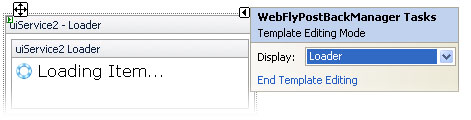

In addition to the visual loading hints feature, you can also block the page UI while the component is busy retrieving data from server side. While the page is blocked, the mouse cursor will be changed to hour glass and UI elements in the page become non-clickable. This feature can be used in conjunction with the loading template to deliver highly sophisticated web application. This feature can be enabled by setting BlockPageUIOnBusy property to True. - Automatic callback (UI mode)
WebFlyPostBackManager component provides robust, high performance architecture which is based on FlyPostBack technology. While it can be used as general purpose function for client/server communication and data exchange, it can also be operated in UI (User Interface) mode. In UI mode, you can use the FlyPostBackManager component to refresh specific server side controls without causing full page postback.
When the EnableUIMode property is set to True, you can decide whether all ASP.NET standard controls should be converted to use FlyPostBack or only specific individual controls by configuring the UpdateMode property. The default value is AllControls.
If you would like only specific invidual controls to take advantage of the automatic callback, you can specify the controls' ID in the UpdateControls collection.
This feature can only be enabled when the component is using WebForm mode (ServiceType = WebFom). -
You can place your codes in the control's events the same way and manner as the WebForm is operating in full postback.
-
The results of the rendering are delta. That means modified controls are automatically detected, and only modified controls are rendered back to client.
-
Page life cycle and view state is persisted automatically between postbacks. Note that the PostInputControls and PostViewState property in the FlyPostBackSettings should be automatically set to True when you enable the UI mode.
-
No single line of javascript codes is required.
-
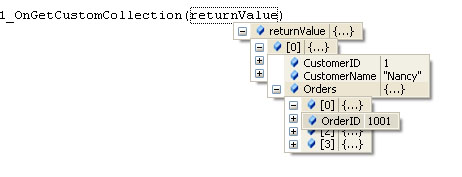
You can access the custom objects automatically in the client side, even without the function definition in the javascript codes. See following screenshot for more details.