


Objectives
WebDesktopManager which implements great flexibility architecture, gives you the options to customize numerous window configurations. This tutorial will guide you to specify minimum and maximum size for a Window to be resized.
- Drag WebDesktopManager into a WebForm.
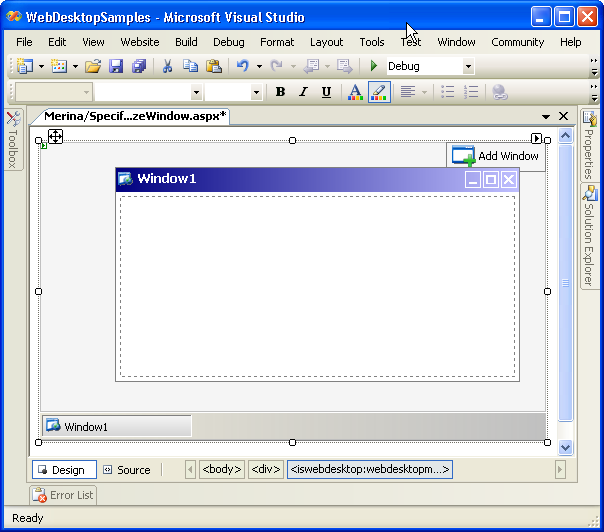
- Right click on the WebDesktopManager's instance and click WebDesktopManager Designer to display the Designer Window.
- Click on the Properties - Windows and select "Window1" or any other windows that you want to set the
maximum and minimum size. Change the MaximumSize and MinimumSize in WindowSettings property to suit your needs.
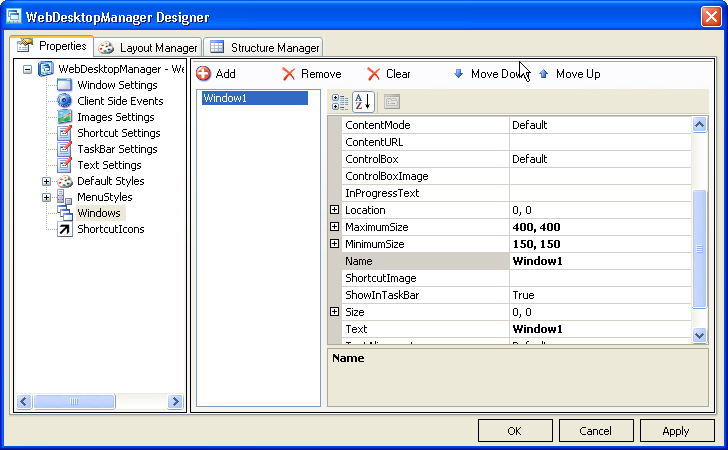
- Click on Apply button on bottom right corner of the designer, and then click OK to apply all the changes.
- Save all the changes, build the project, and run the application.
 See Also
Related Articles
{Creating Simple Desktop}