


WebDesktopManager allows user to create new window at runtime.
This topic will show you how to add new window from client-side.
To add new window at client-side
- Drag WebDesktopManager from Toolbox into a WebForm page.
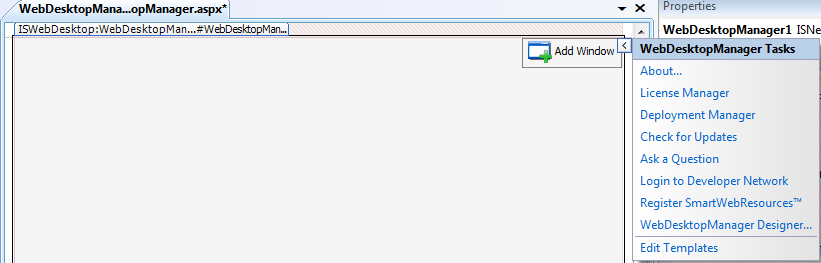
- On the upper-right corner, click the arrow next to Add Window TaskBar. It is known as WebDesktopManager Tasks.
- Click Edit Templates.
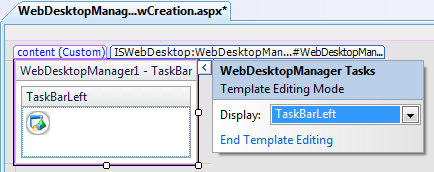
- Click the DropDownArrow and choose TaskBarLeft.
- Drag a HTML Image control from the ToolBox to the TaskBarLeft. You may customize the image from its properties according to your needs.
- In the client-side, add the following code:
JavaScript  Copy Code
function AddWindow() { var dm = ISGetDesktopManager(); var wnd = dm.GetWindow("wndAboutDM"); if (wnd == null) { wnd = new WebDesktopWindow(); wnd.Text = "About DesktopManager"; wnd.Name = "wndAboutDM"; wnd.ControlBoxImage = "is_webdesktop-16.gif"; wnd.ContentURL = "../About.aspx"; wnd.ContentMode = "UseIFrame"; wnd.AllowMinimize = "No"; wnd.AllowMaximize = "No"; dm.Windows.Add(wnd); wnd.Show(); wnd.ResizeTo(600, 400); wnd.MoveToCenterDesktop(); } else { wnd.Activate(); } }
- Invoke AddWindow() function from the image's onclick event.
Script Copy Code<taskbarlefttemplate> <img src="../Images/WebDesktopIconRound.png" onclick="AddWindow()" style="CURSOR: pointer" title="New Window"> </taskbarlefttemplate>
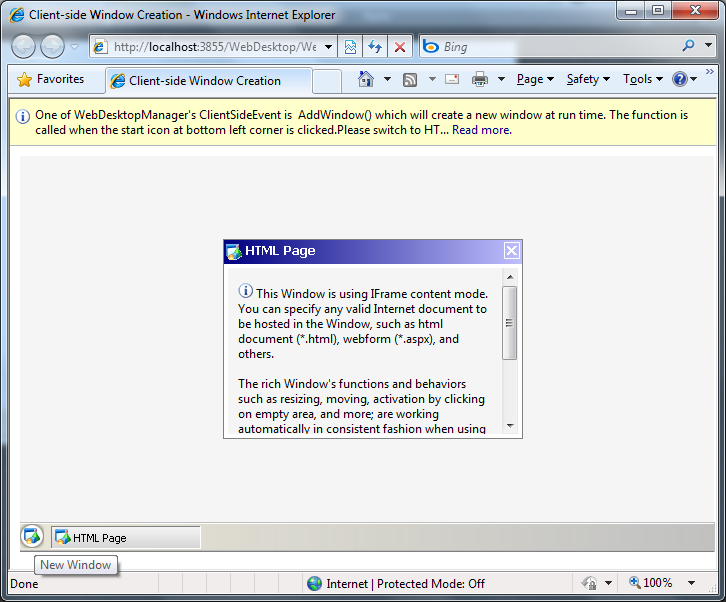
- Run the project and click the image on the bottom-left corner, which is indicated as New Window. It will display a new window like the following.
 See Also
Related Articles
{Creating Simple Desktop}