


By using ComplexImages, you can build your own style in WebCallOut.
This topic shows how to set ComplexImages from WebCallOut's Properties.
To use ComplexImages in WebCallOut
- Right click on WebCallOut control and choose Properties.
- Set TargetControlId to the control you want to use.
- Set LayoutMode to ComplexImages.
- Expand ImagesSettings and you can freely customize each property using your own images.

- By default, ComplexImages will look like following:
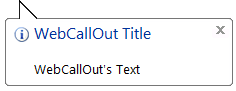
- Set LayoutMode to Simple, and the WebCallOut will look following:

 See Also
Concepts
{ComplexImages}