


Introduction
WebExplorerPane is the server control object serving as the root container for WebExplorerBar objects as well as other available configurations. WebExplorerPane consists of two main user interface elements listed in the following:
- Pane Header
- Image
- Text
- Expand/Collapse Image
- Pane Content (expandable/collapsible)
- PaneItem
A Pane is represented by WebExplorerBar object which is contained in Panes collection of WebExplorerPane. WebExplorerBar can be constructed in either design-time or runtime.
A Pane may consist of one or more items called PaneItem, represented by WebExplorerBarItem, which mainly used as navigation links. The WebExplorerBarItem can be easily manipulated and accessed through Items collection provided by each WebExplorerBar object.
The WebExplorerBar's Items will be used and rendered when the WebExplorerBar's ContentMode is set to UseItems by default. For extensibility or customized content, you may set the ContentMode to UseInlineContent and put any kind of ASP.NET's server controls. You can also use UseIFrame ContentMode for better reusability. The ContentMode property can be found in PaneSettings object which contains global configurations for WebExplorerBar (Pane).
The WebExplorerBarItem object provides following features for effective navigation purpose:
- TargetURL
- TargetWindow
More Details
The following shows the hierarchy of a common WebExplorerPane configuration:
- WebExplorerPane - WebExplorerPane1 (Root Control)
- Panes (Collection)
- WebExplorerBar - barFileAndFolder
- PaneItems (Collection)
- WebExplorerBarItem - itmRenameFolder
- WebExplorerBarItem - itmMoveFolder
- WebExplorerBarItem - itmCopyFolder
- WebExplorerBarItem - itmPublishFolder
- WebExplorerBarItem - itmShareFolder
- WebExplorerBarItem - itmEmailFolder
- WebExplorerBarItem - itmDeleteFolder
- PaneItems (Collection)
- WebExplorerBar - barOtherPlaces
- PaneItems (Collection)
- WebExplorerBarItem - itmMyDocuments
- WebExplorerBarItem - itmMyComputer
- WebExplorerBarItem - itmMyNetworkPlaces
- PaneItems (Collection)
- WebExplorerBar - barDetails
- WebExplorerBar - barFileAndFolder
- Panes (Collection)
For better understanding of WebExplorerPane hierarchy in visual details, please examine the illustration provided in the following:
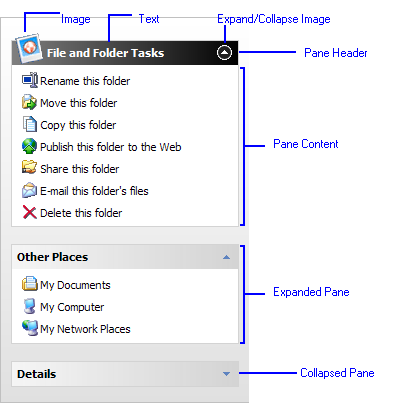
The Pane of "File and Folder Tasks" is the SpecialPane, as displayed in the above image, the pane header style is different to the others pane header style. The SpecialPane can be set through SpecialBarIndex property, whose default value is 0 means the first pane in the Panes collection. The pane header image can be set floating (the image height exceed the bar height (size)) by setting the ImageHeight property bigger than the Size property.
WebExplorerPane also allows you to customize many user interface elements behaviors, such as CaptionDisplayMode, ContentMode, ImageSize, ImageHeight, Size of the pane header, BarSpacing and more. The configurations for WebExplorerBar (pane) can be set in global level at PaneSettings or at individual WebExplorerBar object level. Likewise, configurations for PaneItem can be set in global level at BarItemSettings or at individual WebExplorerBarItem object level.
Styles
In addition to the sophisticated object model design and rich behaviors, WebExplorerPane also provides comprehensive customization in visual styles which allow you to achieve professional desktop-like styles in minutes. As the standard of all Intersoft's products, the styles can be easily programmed and configured through strongly-typed object oriented Style.
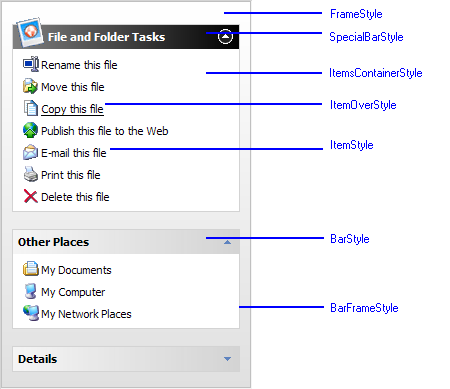
The following image shows the illustration of all configurable Style in WebExplorerPane.
 |
The above is the default style of WebExplorerPane which is applied automatically when you drop an instance of WebExplorerPane to designer's surface. For most cases, there are no significant changes required to the default styles and hence lets you quickly proceed to your further application development tasks. |
 See Also
Related Topics
{Overview}
{Features}