


Introduction
Client side events are the way to greatest level of extensibility where developer can integrate their own algorithm or logic when specific events are occurred. DesktopManager offers the most comprehensive client side events up to 17 client events, from context menu, control initialize, shortcut selected and created to complete window events such as creation, moved, destroyed, resized and more.
Client Side Events
The following table lists the client side events available in this release.
| Client Side Event | Description |
| OnContextMenu | Invoked when a context menu is about to be displayed. |
| OnInitialize | Invoked when the control is initialized. |
| OnShortcutAfterLaunched | Invoked after Shortcut has been launched. |
| OnShortcutBeforeLaunched | Invoked before Shortcut is launched. |
| OnShortcutCreated | Invoked when the Shortcut is created. |
| OnShortcutSelected | Invoked when the Shortcut is selected. |
| OnWindowAfterActivated | Invoked after the Window is activated. |
| OnWindowAfterClosed | Invoked after the Window is closed. |
| OnWindowBeforeActivated | Invoked before the Window is activated. |
| OnWindowBeforeClosed | Invoked before the Window is closed. |
| OnWindowCreated | Invoked when a Window is created. |
| OnWindowCreating | Invoked when a Window is in the process of creating. |
| OnWindowMaximized | Invoked when a Window is maximized. |
| OnWindowMinimized | Invoked when a Window is minimized. |
| OnWindowMoved | Invoked when a Window is moved. |
| OnWindowResized | Invoked when a Window is resized. |
| OnWindowRestored | Invoked when a Window is restored. |
Handling Client Side Events
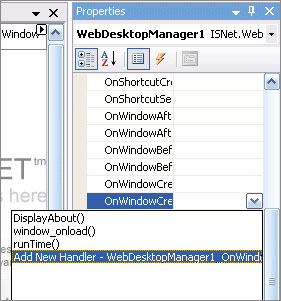
Handling client side event in WebDesktopManager can be easily done using ClientSideEvent TypeEditor which is integrated in Visual Studio's property window. This time-saving feature enables you to assign the function name and let the designer automatically creates the function definition as well as the parameters.
The following image shows the ClientSideEvent TypeEditor.
The following is a sample for handling OnWindowCreating event to manipulate window settings before the window is created.
function


 WebDesktopManager1_OnWindowCreating(id, win)
{


 if (win.Name == "wndContactManagement")
  {


                win.Size.Width = 780;


            win.Size.Height = 450;


           win.AllowResize =


"No";
         win.AllowMaximize =


"No";
       }


}
Advanced Feature
In addition to the client side events listed above, DesktopManager introduced an advanced way in handling client side event in a late-binding scenario.
Since WebDesktopManager is designed with "universal shell" in mind, the windows (applications) that hosted on the top of DesktopManager needs to have a scalability degree where the application itself can subscribe to the Window event without has to handle from the DesktopManager level.
In this context, DesktopManager is only serving as host and does not know the application's information it contain at the time of loading, until the application is launched and registered to the DesktopManager at latter time.
In this release, there are 9 individual events available at Window level, which can be subscribed using late-binding scenarios:
- OnAfterActivated
- OnAfterClosed
- OnPrepareClosed
- OnBeforeActivated
- OnBeforeClosed
- OnMaximized
- OnMinimized
- OnResized
- OnRestored
The following illustration describes the details on how to handling the events in late-binding way.
Assume there are 2 webforms, one is the Default.aspx containing WebDesktopManager instance, and the second is the App.aspx that hosted by the WebDesktopManager in Default.aspx
Default.aspx - WebDesktopManager1
|------ App.aspx
In App.aspx, you might want to handle the OnBeforeClosed event so that you can prompt the users to save modified files before the Window is destroyed.
To do so, you're required to do the following:
- Attach a function for window's onload. The attached function will call necessary codes to register the event handling shown in details below.
- Attach a function for window's onunload event. The attached function is to clear up any resources used for the event handling.
function


 PageLoaded()
{


     // hook WebDesktopWindow event programmatically


 // this uses special client side events which exposed for programmatic created window


   var curWindow = ISGetCurrentWindow();
       ISEvent.AddFunctionHandler(curWindow,


"OnBeforeClosed", OnWebPadBeforeClosed);
 curWindow.EventsRegistered =


true;
}


// called when the page is unloaded. ie, when the page is refreshed.


function PageUnloaded()


{


     var curWindow = ISGetCurrentWindow();


  // important to unregister the window handler by calling RemoveFunctionHandler


       ISEvent.RemoveFunctionHandler(curWindow,


"OnBeforeClosed", OnWebPadBeforeClosed);


}
Codes Discussion
- In the App.aspx, you can obtain the WebDesktopWindow object that host the WebForm by using ISGetCurrentWindow() global function.
- You used ISEvent.AddFunctionHandler to register the function pointer to the specific window and event name. First parameter of the function is the object to register, followed by the event name and the function pointer.
- In PageUnloaded function, you must remember to unregister the event by calling ISEvent.RemoveFunctionHandler.
 |
Your application may result in crash or unexpected behaviors if you did not implement the RemoveFunctionHandler during window's unload event. |