Introduction
One of WebDesktop's most powerful features is the ability to accommodate a broad range of scenarios through its extendable capability using client-side events. In this section, we will see how we can attach a client-side event handler to the event using the Client-side Event Editor.
Assuming that you have already created the shortcut icon and you want to perform other tasks after the shortcut is created, the steps needed are as following:
- Switch to design view of the page and right-click on the WebDesktopManager, then select Properties.
- In the Properties tab, expand ClientSideEvents node.
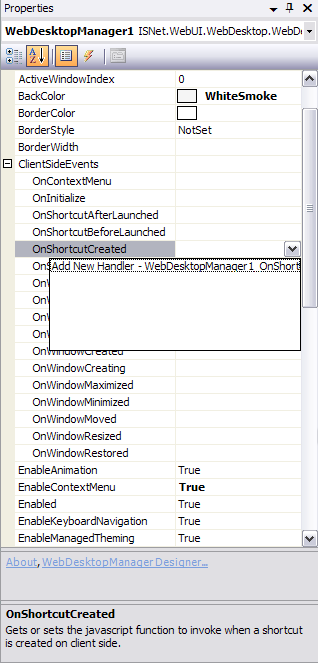
- Find the OnShortcutCreated event and click the drop down arrow. In the drop down list you will see an item 'Add New Handler - WebDesktopManager1_OnShortcutCreated_1(controlId, shortcut)' and/or other event handler names if the page has already contained other client-side event handlers.
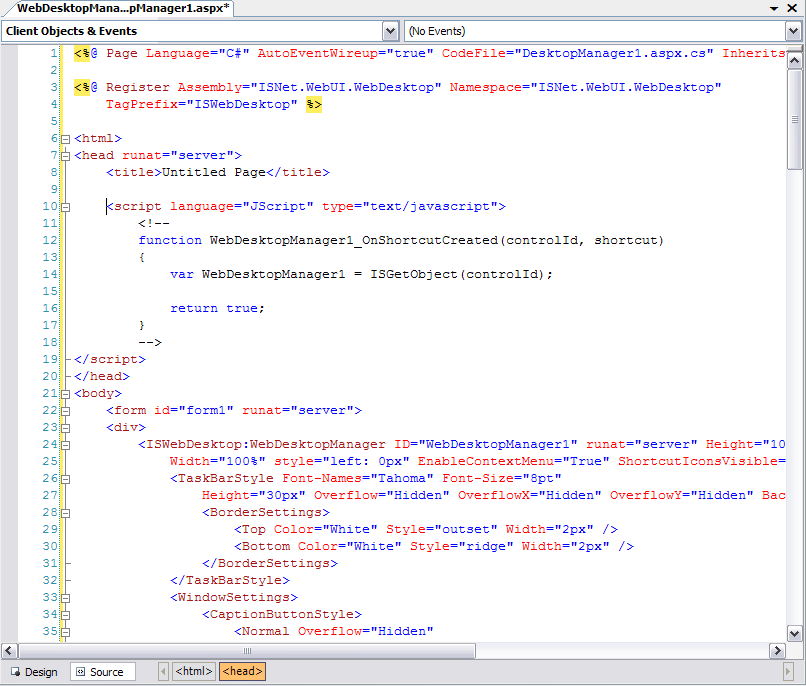
- Click on the 'Add New Handler...' item. The page will then automatically switch to HTML view and the event handler will be automatically added in
the page.