


Introduction
With WebTab's ComplexImages RenderMode option, you can customize your WebTab appearance using images to be more stylish and complex.
Customizing the appearance and behavior of your WebTab control by using "ComplexImages" RenderMode enable three new unique advanced features which include the capability of having a True Tab behavior which allows the inactive tabs'edges to be overlapped by the active-tab item, setting the visibility of the active tab's divider, and using the special right separator.
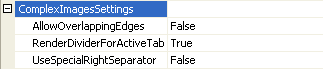
picture1: Properties included in ComplexImagesSettings
AllowOverlappingEdges Feature
As what have been stated in the introduction section, by setting the RenderMode into "ComplexImages", we can simulate the true tab behavior which allows the inactive tabs' edges to be overlapped by the active-tab item.

picture2: When AllowOverlappingEdges is set to false, then the edges of the tab will not overlapped each other.

picture 3: When AllowOverlappingEdges is set to true, then the edges of the tab will overlapped each other.
To enable the overlapping edges feature from WebTab, firstly you will need to set the RenderMode to "ComplexImages", followed by setting the property AllowOverlappingEdges to true (by default the value of this property is false). You will also need to specify the images of every part of the element's edges in ImagesSettings. Each element's part requires two set of images to represent the Inactive and Active state of the tab header's intersection part.
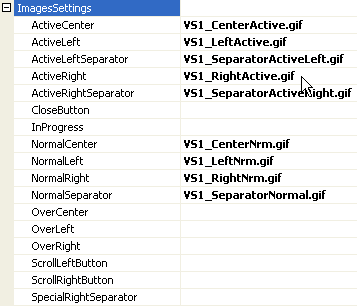
picture4: Images that need to be set in order to get OverlappingEdges feature.
RenderDeviderForActiveTab
RenderDividerForActiveTab property indicates whether the divider between header and content should be rendered in ActiveTab. For this property to take an effect, you will need to set the RenderMode to "ComplexImages". By default, RenderDeviderForActiveTab property is set to true. To disable the divider for active tab, you will need to set the property RenderDeviderForActiveTab to false.
UseSpecialRightSeparator
UseSpecialRightSeparator indicates whether the Tab control should render the tabs'separator on the right side of ActiveTab using special images. This property can be used to achieve look and feel similar to Visual Studio 2005 tabs.
For this property to take an effect, you will need to set the RenderMode to "ComplexImages". By default, UseSpecialRightSeparator property is set to false. To use special right separator, you will need to set the property UseSpecialRightSeparator to true. You will also need to specify the images of every part of the element's edges, and one image that will make a difference by using special right separator is SpecialRightSeparator image. Each element's part requires two set of images to represent the Inactive and Active state of the tab header's intersection part.
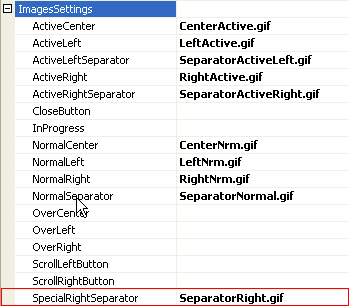
The pictures below illustrate how the UseSpecialRightSeparator will have an effect on your WebTab appearance.

picture1: The normal tab with some image settings, UseSpecialRightSeparator is set to false.

picture2: When UseSpecialRightSeparator property is set to true and SpecialRightSeparator image is set to use specific image.