


You can have various shortcut types in MenuBar.
This topic will show you how to create MenuBar with shortcuts.
To create MenuBar with Shortcuts
- Right click on WebMenuBar control and choose Visual Menu Builder.
- Create a MenuBar item. For example: File or Edit.
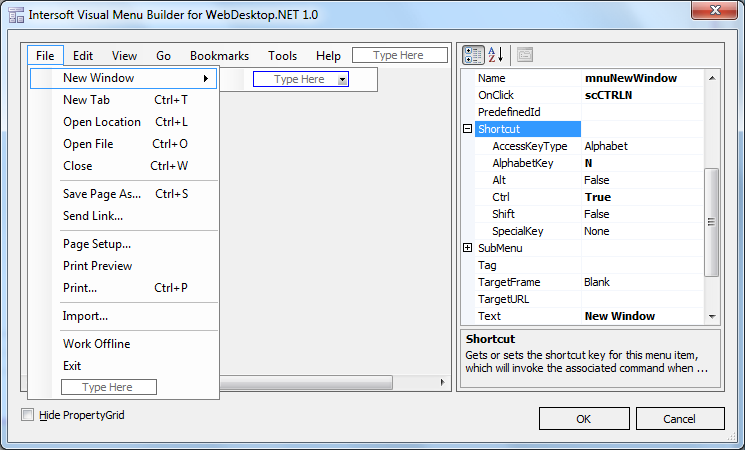
- Create the MenuBar item collection. For example: New Window, New Tab.
- In MenuBar item collection Properties, expand Shortcut.
- In Shortcut, you can customize shortcut types. In this case, set AlphabetKey to N and Ctrl to True.
- Set OnClick to scCTRLN.
- Create scCTRLN() function to give alert when you press CTRL+N from keyboard.
JavaScript  Copy Code
function scCTRLN() { alert("Performing Ctrl+N : File-New Window"); }
- Run the project. When you press CTRL+N, MenuBar will trigger New Window and invoke scCTRLN() function.