


Introduction
ClickAndEdit is a productivity feature for Visual Studio 2005 Development Environment allowing you to easily perform editing in a container-type control, such as WebDesktopManager or WebTab.
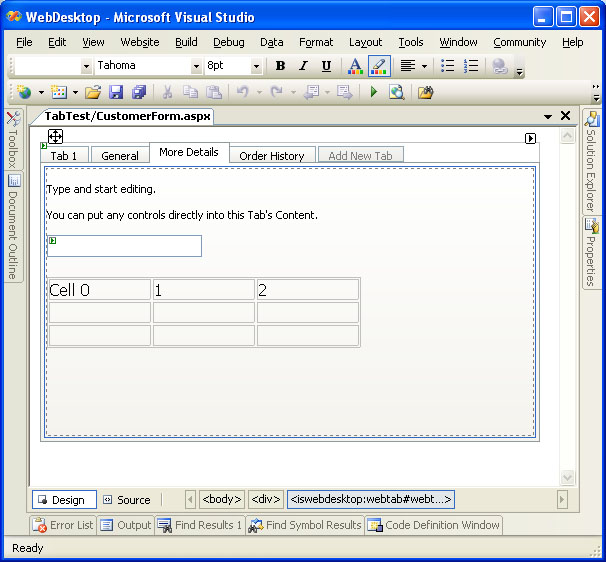
With ClickAndEdit, you no longer required to use workaround or the need to interact with different instances of "readonly" and 'editable" instance of one container control. For instance, you typically require a TabHeader instance and another TabView instance which match up to the TabHeader. The things might become more complicated and difficult to maintain when you need to add more tab headers. The ClickAndEdit technology completely solves this problem by adding the capability to edit directly into the control's visual boundary and exposes new functions which are never possible before.
The following screenshot illustrates the main function of ClickAndEdit.
Supported Products
This section lists the components which implemented ClickAndEdit technology:
- WebDesktopManager
- WebTab
- WebPaneManager
- WebDialogBox
- WebNavPane
Benefits
The following is a list of top benefits offered by ClickAndEdit:
- Improved productivity by removing complexity and unnecessary actions while interacting with container control.
- Enhanced development experience with the convenience of editing through one button click.
- Easy to use and learn, minimizing the learning curve required to develop with the components.
- Faster user interface implementation with better WYSIWYG visualization since no separate template view is needed.