


WebCallOut supports 2 mode of ContentMode, which are UseText and UseTemplate.
This topic shows how to set ContentMode in WebCallOut.
To set ContentMode in WebCallOut
- Right click on WebCallOut control and choose Properties.
- By default, ContentMode will be set to UseText. Set Text to WebCallOut's Text and Title to WebCallOut's Title.
- Set TargetControlId to the control you want to use, such as Label1. The WebCallOut will look like following:

- Now, Set ContentMode to UseTemplate.
- Right click on WebCallOut control and choose Edit Template >> WebCallOut Items.
- Drag ASP.NET TextBox and HTML button controls to the WebCallOut Items template.
- Named the HTML button as Submit and set TargetControlId to the control you want to use, such as Label2.
- Create a function called Button1_onclick().
C#  Copy Code
function Button1_onclick() { var txt = document.getElementById("ctl00_content_WebCallOut2_WebCallOut2_C_TextBox1"); var lbl = document.getElementById("ctl00_content_Label2"); lbl.innerText = "Hello : " + txt.value; }
- Invoke the function in HTML button, such as:
<input id="Button1" type="button" value="Submit" onclick="Button1_onclick()" />
-
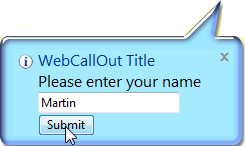
When you run the project, you need to enter your name in the WebCallOut.

-
Click Submit and the inputted name will be displayed in the label.

 See Also
Concepts
{ContentMode}