


WebCallOut supports 5 modes to display its pointing position in the Properties.
This topic shows how to customize pointing position in WebCallOut.
To customize pointing position in WebCallOut
- Right click on WebCallOut control and choose Properties.
- Set TargetControlId to the control you want to use.
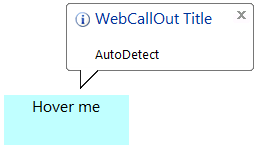
- When you set PointingPosition to AutoDetect, WebCallOut will adjust the pointing position based on the control position that is specified in TargetControlId, PreferrableVerticalPosition and PreferrableHorizontalPosition properties.
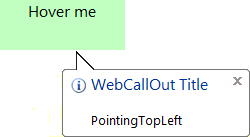
- When you set PointingPosition to PointingTopLeft, WebCallOut will appear on the TopLeft of control specified in TargetControlId.
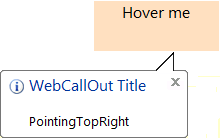
- When you set PointingPosition to PointingTopRight, WebCallOut will appear on the TopRight of control specified in TargetControlId.
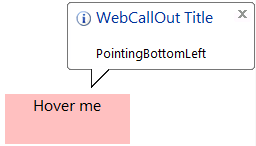
- When you set PointingPosition to PointingBottomLeft, WebCallOut will appear on the BottomLeft of control specified in TargetControlId.
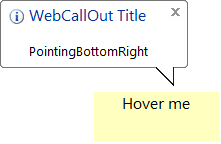
- When you set PointingPosition to PointingBottomRight, WebCallOut will appear on the BottomRight of control specified in TargetControlId.
 See Also
Concepts
{Customizable Pointing Position}