You can enable AJAX callback using WebDragDropExtender.NET V1.0.
This topic will show you how to enable AJAX callback and perform server side tasks using drag drop.
To enable AJAX callback
- Select a WebDragDropExtender instance, then press F4 to display the property window.
- Expand DropSettings.
- Set AutoPostBackOnDragDrop to Yes.
- Set PostBackMode to FlyPostBack.
The declarative markup sample:
<ISWebDesktop:WebDragDropExtenderID="WebDragDropExtender1" runat="server">
      <DragControls>
           <ISWebDesktop:WebDragControl ControlID="Panel1" DragData="Hello" />
      </DragControls>
      <DropControls>
          <ISWebDesktop:WebDropControl ControlID="Panel3" />
      </DropControls>
      <DropSettings AutoPostBackOnDragDrop="Yes" PostBackMode="FlyPostBack" />
</ISWebDesktop:WebDragDropExtender> |
To perform server side tasks upon drag drop
- Click Events in the Property Window's command bar.
- Double click on the DragDrop event.
As soon as you double click the DragDrop event, you will be taken to the code window as shown in the following image.
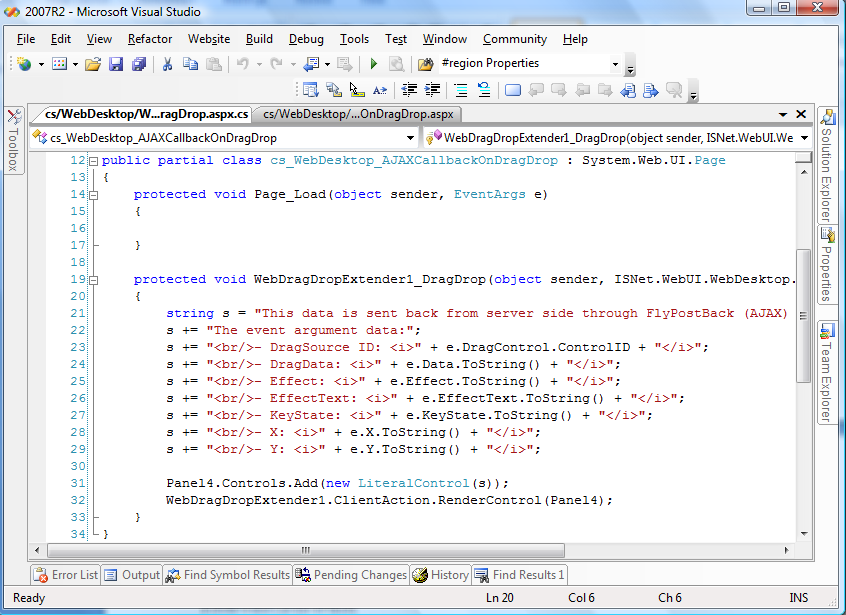
Finally, write your own codes to handle business logics according to the drag-drop context available in the event argument.
C# sample codes:
protected void WebDragDropExtender1_DragDrop(object sender, ISNet.WebUI.WebDesktop.WebDragDropEventArgs e)
{
string s = "This data is sent back from server side through FlyPostBack (AJAX) call.<br/><br/>";
s += "The event argument data:";
s += "<br/>- DragSource ID: <i>" + e.DragControl.ControlID + "</i>";
s += "<br/>- DragData: <i>" + e.Data.ToString() + "</i>";
s += "<br/>- Effect: <i>" + e.Effect.ToString() + "</i>";
s += "<br/>- EffectText: <i>" + e.EffectText.ToString() + "</i>";
s += "<br/>- KeyState: <i>" + e.KeyState.ToString() + "</i>";
s += "<br/>- X: <i>" + e.X.ToString() + "</i>";
s += "<br/>- Y: <i>" + e.Y.ToString() + "</i>";
Panel4.Controls.Add(new LiteralControl(s));
WebDragDropExtender1.ClientAction.RenderControl(Panel4);
}
|
 See Also


 Copy Code