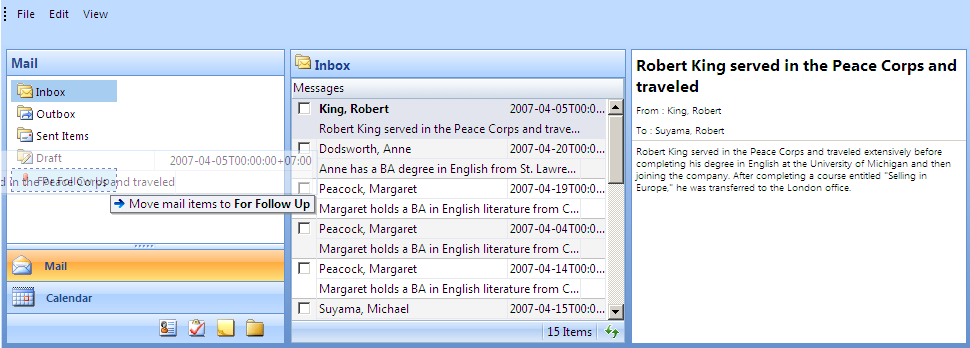
This walkthrough shows you how to use IsSubObject and SubObjectContext to retrieve the target drop object of WebNavPane control.
During this walkthrough, you will learn how to do the following:
- Use WebDragDropExtender to allow the drag panel dragged to drop panel.
- Use IsSubObject and SubObjectContext.
- Integrate WebDragDropExtender and Intersoft controls.
 Prerequisites
In order to complete this walkthrough, you will need the following:
- Visual Studio 2005 Application.
Step-By-Step Instructions
To enable a panel server control to be dragable across child IFRAMEs.
- Launch Visual Studio.NET 2005.
- Click on File menu, then select New and click Web Site.
- Select ASP.NET Web Site in the Template box and set Location to HTTP.
- Named the Web Site and click OK.
- Right-click on Project's name and select Add New Item.
- Select Intersoft AppForm in the My Templates box and named it as Walkthrough.aspx.
- Drag WebPaneManager instance from ToolBar to WebForm and set the pane to 3 parts.
- Drag WebNavPane instance to the first pane. Don't forget to set the WebNavPane's bar and items.
- Drag WebGrid instance to the second pane.
- Drag WebFlyPostBackManager instance to the page.
- Drag WebDragDropExtender instance from ToolBar to WebForm.
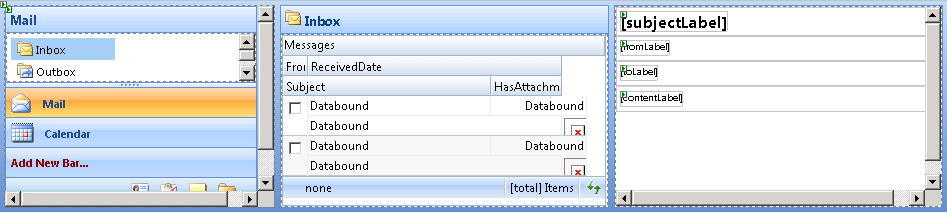
- Set the grid's datasource from code behind.
C#  Copy Code
protected void WebGrid1_InitializeDataSource(object sender, ISNet.WebUI.WebGrid.DataSourceEventArgs e) { XmlDataDocument xml = new XmlDataDocument(); WebNavPane navPane = WebPaneManager1.FindControl("WebNavPane1") as WebNavPane; if (!IsPostBack) xml.DataSet.ReadXml(Server.MapPath("Inbox_Data.xml"), XmlReadMode.Auto); else xml.DataSet.ReadXml(Server.MapPath(navPane.ActiveBar.ActiveBarItem.Text + "_Data.xml"), XmlReadMode.Auto); if (xml.DataSet.Tables.Count > 0) { e.DataSource = xml.DataSet.Tables[0].Copy(); } else { xml.DataSet.ReadXmlSchema(Server.MapPath("Schema.xml")); e.DataSource = xml.DataSet.Tables[0].Clone(); } }
- You also need to set the InitializeRow and RowChanged event handler and use the following code:
C# Copy Codeprotected void WebGrid1_RowChanged(object sender, RowChangedEventArgs e) { if (e.Row.Type == RowType.Record) { // get the content's object Label subjectLabel = WebPaneManager1.FindControl("subjectLabel") as Label; Label toLabel = WebPaneManager1.FindControl("toLabel") as Label; Label fromLabel = WebPaneManager1.FindControl("fromLabel") as Label; Label contentLabel = WebPaneManager1.FindControl("contentLabel") as Label; // set the content's data subjectLabel.Text = e.Row.Cells.GetNamedItem("Subject").Text; toLabel.Text = "To : " + e.Row.Cells.GetNamedItem("To").Text; fromLabel.Text = "From : " + e.Row.Cells.GetNamedItem("From").Text; contentLabel.Text = e.Row.Cells.GetNamedItem("Contents").Text; } } protected void WebGrid1_InitializeRow(object sender, RowEventArgs e) { if (e.Row.Type == RowType.Record) { WebGridCell hasAttachment = e.Row.Cells.GetNamedItem("HasAttachment"); if (hasAttachment.Value.ToString() == "True") hasAttachment.Text = "../images/Attachment.gif"; else hasAttachment.Text = "../images/wg_blank.gif"; } }
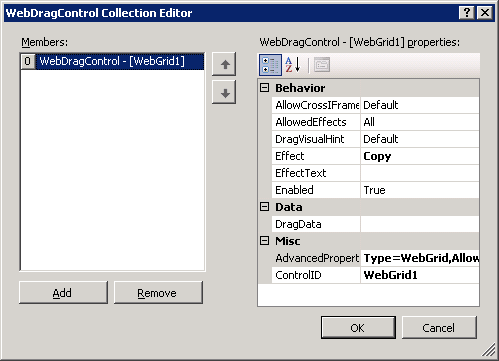
- Click on WebDragDropExtender instance and press F4.
- On DragControls property, click the (collection) button to open WebDragControl Collection Editor. You can set which panel will be the DragControl.
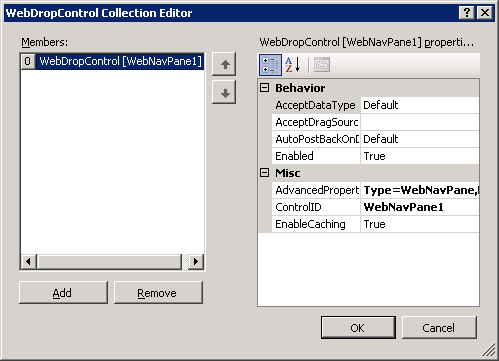
- On DropControls property, click the (collection) button to open WebDropControl Collection Editor. You can set which panel will be the DropControl.
- In ClientSideEvents, set OnDragOver to DragOver.
- In ClientSideEvents, set OnDragDrop to DragDrop.
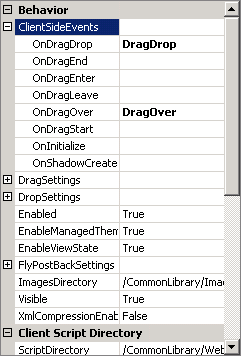
- Here is the complete javascript code for all the client side events:
JavaScript Copy Codefunction DragOver(controlId, e, dropObject) { if (dropObject.IsSubObject) { /* get the context of the sub object being hovered */ var dropItem = dropObject.SubObjectContext; /* if the hovered item's type is WebNavBar */ if (dropItem.ItemType == "WebNavBar") { /* get the real WebNavBar object being hovered */ var bar = dropItem.ItemObject; /* set effect text based on hovered item to give feedback to user */ switch (bar.Text) { case "Mail": e.EffectText = ""; break; case "Calendar": e.EffectText = "Add mail items to calendar."; break; case "Contacts": e.EffectText = "Add sender to contact."; break; case "Tasks": e.EffectText = "Create new task for the selected mail items."; break; case "Notes": e.EffectText = "Add mail items to notes."; break; case "Journals": e.EffectText = "Add mail items to journal."; break; } } else if (dropItem.ItemType == "WebNavBarItem") { var navPane = ISGetObject("WebNavPane1"); var activeBar = navPane.GetActiveBar(); var dropItem = dropItem.ItemObject; if (activeBar.Text == "Mail") { var activeItem = activeBar.GetActiveBarItem(); if (activeItem.Text == dropItem.Text) { e.Effect = ISDragDropEffects.NotAllowed; e.EffectText = "Cannot move mail items to the same folder."; } else { e.Effect = ISDragDropEffects.Move; e.EffectText = "Move mail items to " + dropItem.Text + ""; } } } } else { e.EffectText = ""; } } function DragDrop(controlId, e, dropObject) { if (dropObject.IsSubObject) { /* get the context of the sub object being hovered */ var dropItem = dropObject.SubObjectContext; /* if the hovered item's type is WebNavBar */ if (dropItem.ItemType == "WebNavBar") { alert("Perform action such as show the create new '" + dropItem.ItemObject.Text + "' dialog box."); } else { if (e.Effect == ISDragDropEffects.Move) { var np = ISGetObject("WebNavPane1"); var activeBar = np.GetActiveBar(); var activeItem = activeBar.GetActiveBarItem(); /* We need to serialize DragData to xml first because object can't be send as event argument. This process optimizes the data sent to the server during AJAX callback for best performance. */ var s = "<dragdata>"; s += "<currentview>" + activeItem.Text + "</currentview>"; s += "<targetview>" + dropItem.ItemObject.Text + "</targetview>"; s += "<maildata>"; /* loop through the dragged mail items from WebGrid notice that e.DragObject.Data is WebGridDragData object. */ var draggedRows = e.DragObject.Data.Rows; for (var i=0; i<draggedrows.length/>"; } s += "</maildata>"; s += "</dragdata>"; e.data = s; /* proceed with move mail items - see OnDragDrop event in server side */ return true; } } } return false; } function ReinitializeDragControls() { setTimeout(function() { /* this function needs to be called when the Grid is refreshed due to AJAX callback */ var extender = ISGetObject("WebDragDropExtender1"); extender.ReinitializeDragControls(); }, 100); } function RefreshMailItems() { var grid = ISGetObject("WebGrid1"); grid.Refresh(); } /* grid event */ function BeforeRefresh(controlId) { /* unload drag controls to free memory before the Grid is refreshed */ var extender = ISGetObject("WebDragDropExtender1"); extender.UnloadDragControls(); } /* grid event */ function AfterRefresh(controlId) { ReinitializeDragControls(); }
- On the server side, you also need to set WebDragDropExtender1_DragDrop and WebNavPane1_ActiveBarItemChanged. Here is the code:
C# Copy Codeprotected void WebDragDropExtender1_DragDrop(object sender, ISNet.WebUI.WebDesktop.WebDragDropEventArgs e) { XmlDocument xml = new XmlDocument(); xml.LoadXml(e.Data.ToString()); XmlDocument xmlSource = new XmlDocument(); string sourceXmlPath = Server.MapPath(xml.SelectSingleNode("//CurrentView").InnerText + "_Data.xml"); xmlSource.Load(sourceXmlPath); XmlDocument xmlTarget = new XmlDocument(); string targetXmlPath = Server.MapPath(xml.SelectSingleNode("//TargetView").InnerText + "_Data.xml"); xmlTarget.Load(targetXmlPath); XmlNodeList mailItems = xml.SelectNodes("//MailData/Item"); foreach (XmlNode item in mailItems) { string messageID = item.Attributes.GetNamedItem("MessageID").Value; XmlNode srcNode = xmlSource.SelectSingleNode("//MailMessages[MessageID='" + messageID + "']"); srcNode.ParentNode.RemoveChild(srcNode); XmlNode newNode = xmlTarget.CreateNode(XmlNodeType.Element, "MailMessages", null); newNode.InnerXml = srcNode.InnerXml; xmlTarget.DocumentElement.AppendChild(newNode); } xmlSource.Save(sourceXmlPath); xmlTarget.Save(targetXmlPath); WebDragDropExtender1.ClientAction.Alert("Successfully moved " + mailItems.Count.ToString() + " item(s) to " + xml.SelectSingleNode("//TargetView").InnerText + "."); WebDragDropExtender1.ClientAction.InvokeScript("RefreshMailItems();"); } protected void WebNavPane1_ActiveBarItemChanged(object sender, ActiveBarItemChangedEventArgs e) { XmlDataDocument xml = new XmlDataDocument(); xml.DataSet.ReadXml(Server.MapPath(e.ActiveBarItem.Text + "_Data.xml"), XmlReadMode.Auto); WebGrid grid = WebPaneManager1.FindControl("WebGrid1") as WebGrid; DataTable dt = null; if (xml.DataSet.Tables.Count > 0) dt = xml.DataSet.Tables[0].Copy(); else { xml.DataSet.ReadXmlSchema(Server.MapPath("Schema.xml")); dt = xml.DataSet.Tables[0].Clone(); } fpb.ClientAction.InvokeScript("BeforeRefresh();"); grid.SetSelectedObject(null); grid.DataSource = dt; grid.RequiresUIRefresh = true; grid.RebindDataSource(); fpb.ClientAction.InvokeScript("AfterRefresh();"); }
- Run and compile the project.