


This new feature enables window moving and resizing operation to be performed in shadowing mode. That means the actual window will not be taken affect until the operation is done. During the interactive mode, only the shadow of the actual window will be displayed to indicate the current status of the interaction.
Unlike Physical interactivity mode which is the default value and the mode used in previous version, Shadow interactivity mode is significantly faster. It enables the window interaction such as moving and resizing to be performed in a very smooth and robust manner.
This new interactivity mode introduces several advantages:
- Significantly faster performance while moving and resizing window. This is made possible because the heavy contents are not re-rendered during the interaction.
- 100% smooth and robust interaction even with a lot of IFrame-kind of window content. This means, the window can still be smoothly moved and resized even though it is on the top of other IFrame windows. This was one limitation in previous "physical interaction" mode.
- Avoided "resize bogus" and improved resizing stability in Mozilla. Most components today extensively using onresize event to handle the layout and rendering when a container is being resized. The "physical interaction" is surely a performance killer because the onresize events that attached to the resized window will be called massively and continuously. This problem is nothing to worry with the new interactivity mode.
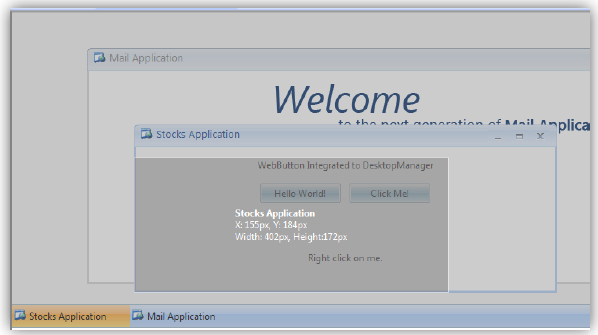
The following is a sample screenshot when the "Stocks Application" window is resized downward:
To change the interactivity mode to Shadow, simply set the WindowInteractiveMode to Shadow in the WebDesktopManager instance.
There are two new properties related to this feature:
- ShadowModeAnimation
The default value is false. This property allows you to add nice fading effect when the moving and resizing is performed in Shadow mode. However, the animation effect is not suitable for complex Web application as it could slow down the screen rendering while performing interaction. - ShadowModeTransparency
By default, the desktop manager screen would be 100% transparent when the moving and resizing is performed in Shadow mode. When this property is set to true, the background of desktop manager will be dimmed to 50% transparent to give user better focus on the interactive operation. The above screenshot shows the ShadowModeTransparency enabled.
 See Also
Other Resources
{Vista-style animation}