


Introduction
TrueDock is the technology allowing end users to dock a Bar (either Toolbar or Menubar) into four edges of designated content area. It is a truly powerful docking technology recognizing its capabilities to intelligently dock into multiple bars or dock into the same row in any edges! It also enables a Bar to be floated when desired. TrueDock automatically maintain its configuration and adjust required settings when the docking changed from horizontal to vertical position. All of these capabilities enable you to offer a high level of user interactivity and personalization for your end users.
More Details
TrueDock works in conjunction with PlaceHolderManager component to partition a Page into several zones. By using the PlaceHolderManager, any bars can be docked within the PlaceHolderManager region in any of four supported edges.
TrueDock supports multiple PlaceHolderManager in one Page. The bars owned by its PlaceHolderManager will be managed by its own PlaceHolderManager and did
not affect other zones in other PlaceHolderManager. See following illustration for more details.
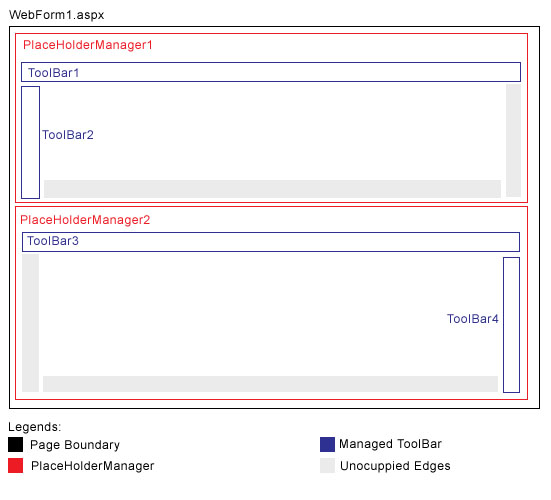
In above illustration:
- ToolBar1 or ToolBar2 can be moved to the available bottom or right edge of PlaceHolderManager1 zone.
- ToolBar3 or ToolBar4 can be moved to the available left or bottom edge of PlaceHolderManager2 zone.

ToolBar can be moved by dragging the Grip/Handle presented in the left edge of a ToolBar.
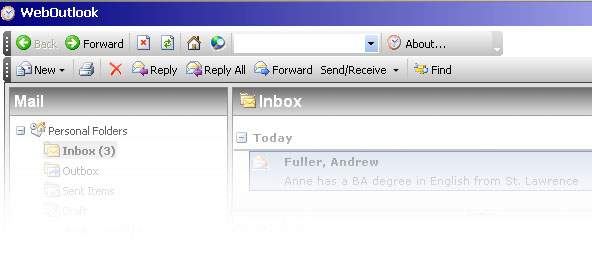
Multiple Rows Docking
Benefits
- Increased user experience with the capability to dock bars in any of four edges in the zone.
- Added values to application with the advanced and powerful docking mechanism.
- More end users personalization options.
- Enhanced productivity with better screen real estate utilization provided by the docking mechanism.