


Background
The Structure Manager is the third and last major feature available in Component Editor. This feature is only available for components which have structure. An example of a structure is Windows Collection in WebDesktopManager, this is named as the structure of the component.
This feature allows structure modification done to the component to be saved into an XML file by clicking on Save Button and can then be re-used by other components. This is one of the main distinguish of Intersoft component where the component object structure can be saved into a file and be loaded again when needed.
Without this feature you will need create your component structure from scratch again which is time consuming and prone to error especially in complex component structure.
UI Introduction
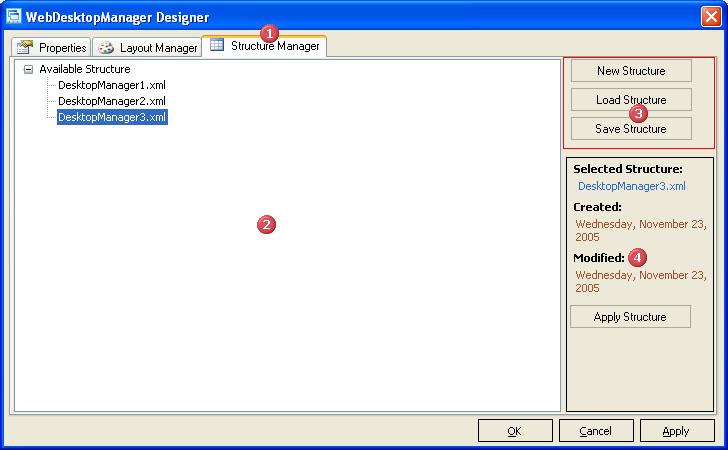
 |
The Layout Manager Tab |
| The TabPage which holds the entire Structure Manager feature | |
 |
The Structure TreeView |
| Used to list the available XML structure in the component's structure folder. The structure folder resides in [InstallFolder]\Structure\[ComponentName]. | |
 |
The Command Panel |
| A panel which contains command buttons containing New, Load and Save. When the New button is clicked the structure of the component will be cleared. | |
 |
The Selected Structure Panel |
| A panel which contains information regarding the currently selected node in the Structure TreeView |