


Background
The Layout Manager is the second major feature available in Component Editor. This feature allows predefined or custom layouts be applied into the currently edited component.
Layout modification done to the component can be saved into an XML file by clicking on Save Layout Button and can then be re-used by other components. This will ensure that the other instance of the same component will have exactly the same Layout appearance. Other than that it also improves efficiency cause we can simply load the XML settings rather than having to apply the Layout properties one by one.
UI Introduction
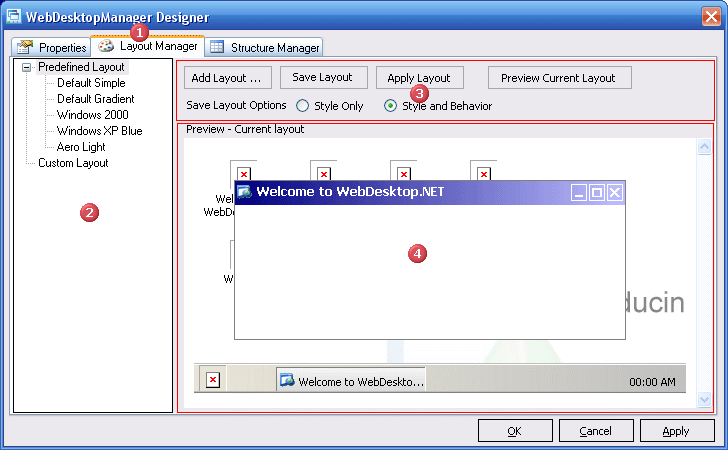
 |
The Layout Manager Tab |
| The TabPage which holds the entire Layout Manager feature | |
 |
The TreeView |
| Used to list the available layout for the component edited. It is basically divided into 2 major nodes which are Predefined and Custom (user-defined layout). | |
 |
The Command Panel |
| A panel which contains command buttons which are used to Add, Save, Apply and Preview layout. | |
 |
The Web Browser |
| A browser inside Component Editor to provide integrated HTML-based user assistance, so the behavior and look of the component can be identified during design-time. |