


Using Theme Editor
The Theme Tab is the place where we can create a theme definition for our Web application. The Theme tab represents a single file (*.ISTHEME) that contains configurations for all the components, pages and/or controls that are contained within the Web application.
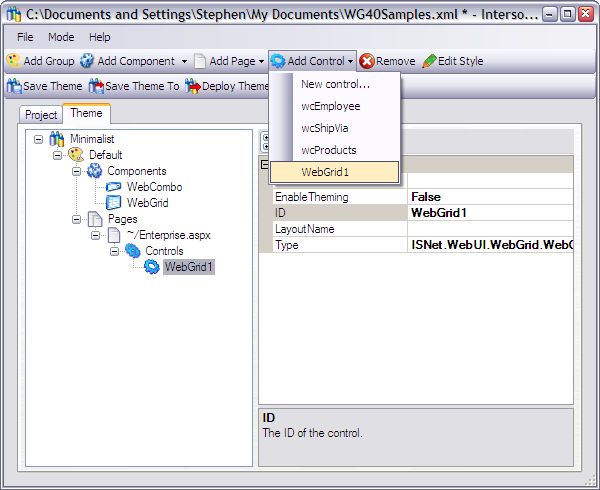
The theme consists of a hierarchy of items:
-
Theme
The theme node is the top node that contains one or more defined groups. The treeview shows the name of the selected theme that you choose in the Project tab.
-
Group
The group is the direct child of a theme. A group consists of Components node that can contain components that are installed on the machine; and Pages node that contains all pages (*.aspx) and user control files (*.ascx) that are available in the Web application. Simply click on the Add Group button to add a group.
The group's properties are:
- BaseGroup
- The group on which this group is based.
- IsDefault
- Specifies if this group is a default group. A theme must have at least one and only one default group defined.
- Name
- The name of the group.
-
Components
The Components node may contain one or more installed components. If you apply style for a specific component here, say WebGrid, then all WebGrids in the Web application will follow the style. You can, however, override the style of certain WebGrid controls by selecting a page and applying different style to the controls directly.
After adding a component you need to specify values for the following properties:
- DataFile
- The filename of the layout/style file. You can select an existing layout file (*.ISL files) from the open file dialog, or just enter a new filename to create a new layout and then click the Edit Style button.
- LayoutName
- The name you give to the layout.
-
Pages
The Pages node allows you to configure style for a specific page. To add a page to the node simply select a page from the Add Page dropdown. The page list in the dropdown is filled based on the Web application physical path that you supply in the Project tab.
The Page object has a number of properties:
- EnableTheming
- Enable theming for this page.
- FileName
- The page or user control filename, for example: ~/Default.aspx. The tilde mark (~) represents the PhysicalPath of the Web application.
- ThemedControl
- Specifies whether all the controls on the page should be styled. If "Partial" is selected, you have to style each control on the page separately.
-
Controls
This node contains controls that you want to apply styles on. To add a control, simply select a control from the Add Control dropdown. The Add Control dropdown lists all Intersoft WebUI.NET controls on the selected page. The control would not be listed in the dropdown if you do not have the component of that control type installed.
- DataFile
- The filename of the layout/style file. You can select an existing layout file (*.ISL files) from the open file dialog, or just enter a new filename to create a new layout then click the Edit Style button.
- EnableTheming
- Specifies whether to enable theming for the control.
- ID
- The control ID.
- LayoutName
- The name that you give to the layout.
- Type
- The type of this component.