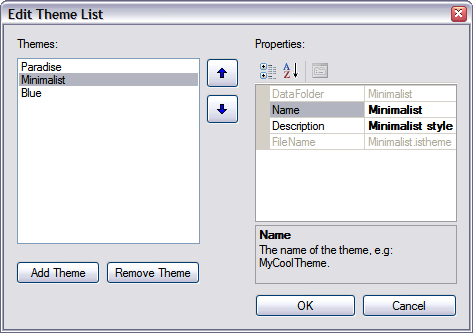
Using Theme List Editor
The Theme List Editor is used to manage a list of available themes in the designated Theme Location that you choose in the Project tab. Theme list editor stores the list as an XML file namely "List.xml", and the Theme Name dropdown is populated according to this list. Before you can create a theme you must add the theme information such as name, data folder, filename to the list and then select the theme in the Theme Name dropdown.

To add a theme simply click on the Add Theme button and enter the name. Right after entering the name, the DataFolder and Filename will automatically be filled according to the name. Note that the list cannot accept duplicate names and removing a theme from the list would not delete the theme data folder that is already created. After supplying the neccessary information, click OK to save the list and select the theme you are going to create in the Theme Name dropdown on the Project tab. Then you can proceed to creating a theme in the Theme tab.